Helium 10 MCP + ChatGPT is a Game Changer for Amazon Sellers
Stop Guessing. Start Asking Better Questions.
If you’ve been selling on Amazon for any length of time, you’ve probably had this experience.
You spend an hour digging through Helium 10.
Then another hour exporting spreadsheets.

Then you copy everything into ChatGPT hoping it can help you analyze the data.
Only to realize…
It doesn’t actually know anything about your Amazon business.
It doesn’t know:
- Your products
- Your keyword rankings
- Your PPC campaigns
- Your competitors
- Your profits
- Your inventory
- Your Search Query Performance data
Instead, it gives you generic advice based on whatever information you manually pasted into the chat.
And every time you want to analyze something new?
You repeat the entire process all over again.
That has always been one of the biggest limitations of AI for Amazon sellers.
Until now.
Helium 10 recently introduced one of the biggest innovations I’ve seen for Amazon sellers in years…
Helium 10 MCP.
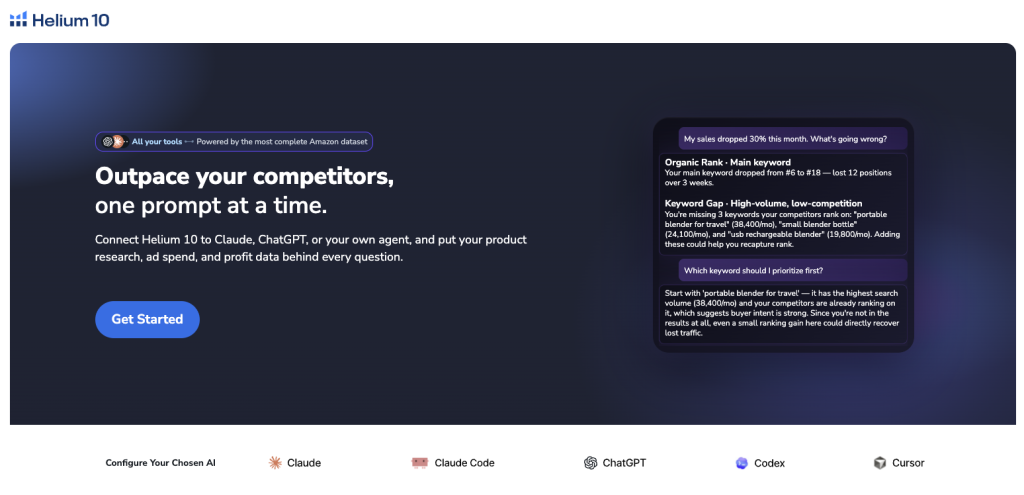
And honestly, I think this completely changes how we’ll use AI to run Amazon businesses going forward.
Instead of asking AI generic questions…
You can now ask AI questions about your actual Amazon business.
Imagine asking ChatGPT:
“Find products in the kitchen category selling over 1,000 units per month with fewer than 200 reviews.”
Or…
“Compare my product against the top three competitors and tell me exactly where I’m losing.”
Or…
“Analyze my Search Query Performance data from the last twelve months and tell me which keywords have the highest conversion rate.”
No spreadsheets.
No exporting reports.
No copy and paste.
Just ask.
And get answers based on your actual Helium 10 data.
That is exactly what Helium 10 MCP allows you to do.
What Is Helium 10 MCP?
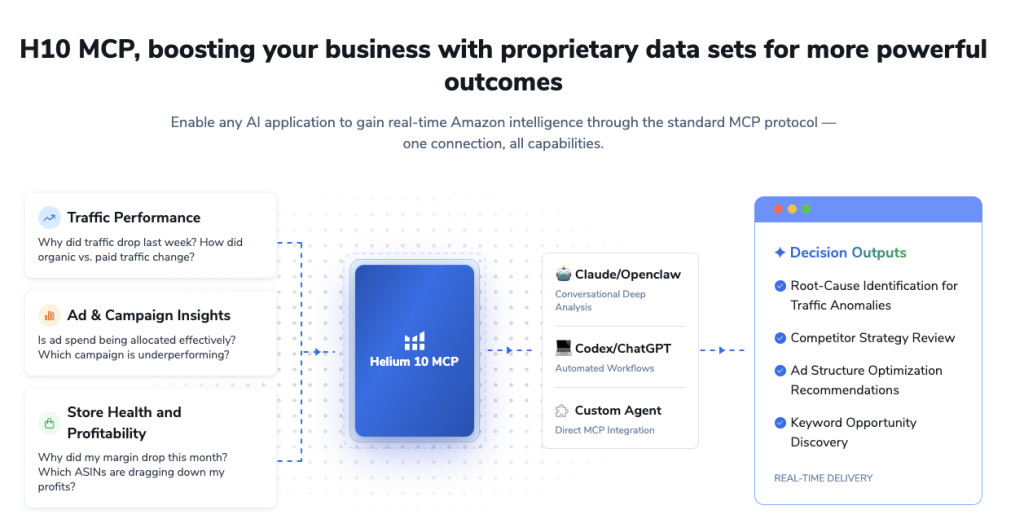
MCP stands for Model Context Protocol.
If you’ve never heard of it before, don’t worry.
The name sounds technical, but the idea is actually very simple.
Think of MCP as a secure bridge between your AI assistant and your Helium 10 account.
Instead of AI relying on generic web information, MCP allows it to securely retrieve live data directly from your Helium 10 account before answering your question.
Here’s what that looks like.
Before Helium 10 MCP
Open Helium 10

↓

Run Black Box

↓

Export data

↓

Open Cerebro

↓

Export data

↓

Open Search Query Analyzer

↓

Export data

↓

Open ChatGPT

↓

Paste everything

↓

Ask AI to analyze it
Now imagine doing that every single day.
It’s slow.
It’s repetitive.
And by the time you’ve gathered all the information, you’ve probably forgotten why you opened the software in the first place.
After Helium 10 MCP
Now the workflow looks like this.
Open ChatGPT Helium 10 MCP

↓

Ask a question

↓

Helium 10 provides the data automatically

↓

AI analyzes it

↓

You receive an answer
That’s it.
One conversation.
One question.
One answer.
The AI figures out which Helium 10 tools it needs, retrieves the data securely, and presents the results in plain English.
Why This Is Such a Big Deal
The biggest problem with using ChatGPT for Amazon selling has never been the AI itself.
The problem has always been context.
ChatGPT is incredibly smart.
But it only knows what you tell it.
If you don’t provide your keyword rankings…
It can’t analyze them.
If you don’t provide PPC data…
It can’t optimize campaigns.
If you don’t provide Search Query Performance reports…
It can’t identify opportunities.
Helium 10 MCP changes that.
Instead of asking AI to make guesses…
You’re asking it to analyze real Amazon marketplace intelligence backed by Helium 10’s proprietary data.
And that’s a massive difference.
Generic AI vs Helium 10 MCP
| Generic ChatGPT | ChatGPT + Helium 10 MCP |
|---|---|
| Generic web knowledge | Your actual Helium 10 account |
| No product data | Live product data |
| No keyword rankings | Keyword rankings |
| No PPC data | Advertising insights |
| No Search Query Performance | SQP analysis |
| No competitor metrics | Competitor intelligence |
| Manual exports | Automatic retrieval |
| Generic recommendations | Personalized recommendations |
This isn’t simply “AI with Amazon.”
It’s AI working directly with the same marketplace intelligence you’re already paying Helium 10 to collect.
Why Generic AI Isn’t Enough
A lot of people think:
“Why can’t I just use ChatGPT?”
You absolutely can.
And I do every single day.
But here’s the limitation.
Suppose you ask:
“What keywords should I target?”
ChatGPT might respond with reasonable suggestions.
But it has no idea:
- Which keywords you’re already ranking for
- Which keywords your competitors dominate
- Which keywords convert best
- Which keywords are losing rank
- Which keywords generate profit
It’s giving educated guesses.
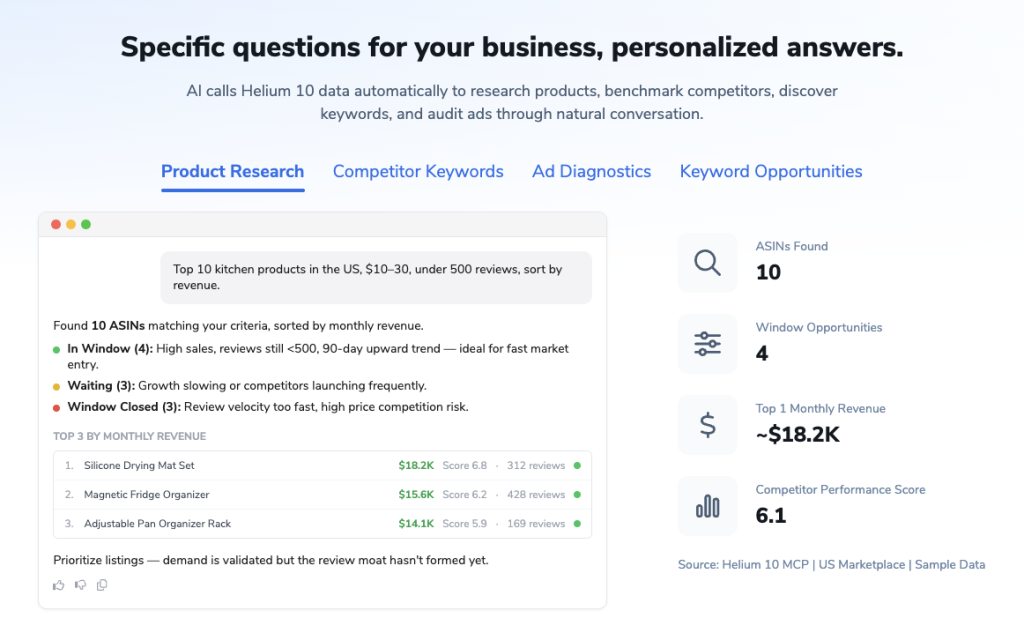
Now imagine asking:
“Using my Helium 10 data, show me every keyword where I’m converting better than the market average but ranking below page one.”
That’s a completely different conversation.
Now AI isn’t guessing.
It’s analyzing.
And that’s where the real value comes from.
Why Helium 10 Is Uniquely Positioned
One reason I’m excited about this is because Helium 10 isn’t a new company jumping on the AI trend.
They’ve been collecting Amazon marketplace intelligence for more than a decade.
According to Helium 10, their platform supports millions of brands worldwide and processes data associated with billions of dollars in Amazon sales every month. That historical marketplace intelligence is what makes MCP valuable—it can combine AI with the rich data Helium 10 already provides.
That’s important because Amazon itself doesn’t expose many of the insights sellers actually need.
Helium 10 adds things like:
- Reverse ASIN intelligence
- Historical keyword rankings
- Search volume estimates
- Product opportunity scores
- Competitor keyword data
- PPC insights
- Profitability analysis
Now imagine putting all of that behind ChatGPT.
That’s exactly what’s happening here.
Think of MCP Like Hiring an AI Business Analyst
Imagine hiring someone whose only job was to answer questions about your Amazon business.
You ask:
“Which keywords should I increase bids on?”
Thirty seconds later…
They’ve already:
- Opened Search Query Analyzer
- Checked Keyword Tracker
- Compared competitor rankings
- Reviewed PPC performance
- Looked at conversion rates
Then they hand you the answer.
That’s essentially what Helium 10 MCP is doing.
Except it works in seconds.
What Makes This Different From Traditional Helium 10 Workflows?
Before MCP, every Helium 10 tool lived separately.
For example:
| Tool | Purpose |
|---|---|
| Black Box | Product research |
| Cerebro | Reverse ASIN keyword research |
| Magnet | Keyword discovery |
| Search Query Analyzer | Conversion analysis |
| Keyword Tracker | Keyword rankings |
| Market Tracker | Competitor monitoring |
| Listing Builder | Listing optimization |
| Ads | PPC management |
Each tool is powerful.
But switching between them takes time.
With MCP…
You don’t necessarily have to think about which tool to use.
You simply ask your question.
The AI determines which Helium 10 data sources are needed and combines them into a single response.
How Helium 10 MCP Actually Works
One of the biggest misconceptions I see is people assuming Helium 10 MCP is simply “ChatGPT with Helium 10.”
It’s actually much more powerful than that.
Helium 10 MCP doesn’t replace ChatGPT or Claude.
Instead, it connects them directly to your Helium 10 account using the open Model Context Protocol (MCP) standard.
Think of ChatGPT as the brain.
Think of Helium 10 as the data source.
MCP is simply the secure bridge between them.
When you ask a question, your AI assistant decides which Helium 10 tools it needs, securely retrieves the appropriate data, analyzes it, and then responds in plain English.
What Happens Behind the Scenes?
Let’s say you ask:
“Which keywords am I losing to my competitors?”
To answer that question, AI might automatically pull information from several different Helium 10 tools.
For example:
| Helium 10 Tool | What It Contributes |
|---|---|
| Cerebro | Competitor keyword rankings |
| Keyword Tracker | Your keyword positions |
| Brand Analytics | Click share and conversion share |
| Search Query Analyzer | Customer search behavior |
| Market Tracker | Competitive landscape |
Instead of you opening each tool manually…
The AI gathers the information for you and combines everything into one answer.
That’s something you simply couldn’t do efficiently before MCP.
You’re No Longer Limited to One Tool at a Time
This is probably my favorite part.
Traditional Helium 10 workflows usually look like this:
Black Box

↓

Find Product

↓

Open Xray

↓

Analyze Product

↓

Open Cerebro

↓

Research Keywords

↓

Open Keyword Tracker

↓

Monitor Rankings

↓

Open Listing Builder

↓

Optimize Listing
Every step requires switching tools.
Every switch costs time.
With MCP, those tool boundaries almost disappear.
Now you can ask something like:
“Analyze my listing, compare it against my top competitors, identify keyword gaps, estimate my profit opportunity, and tell me which PPC campaigns I should prioritize.”
Behind the scenes, MCP can pull information from multiple Helium 10 data sources to answer that one question.
That’s a completely different workflow.
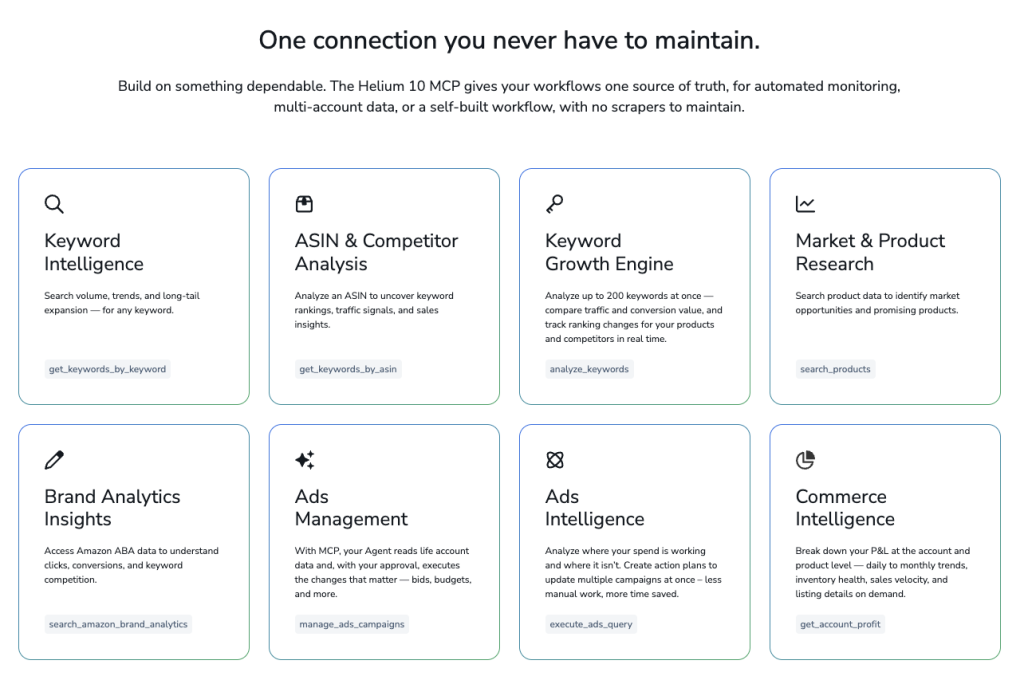
What Data Can MCP Access?
One thing I really like is that Helium 10 didn’t build a connector that only exposes one or two tools.
According to Helium 10, MCP supports dozens of capabilities across product research, keyword research, competitor analysis, advertising, profitability, and marketplace intelligence.
Some of the major areas include:
| Capability | Examples |
|---|---|
| Product Research | Black Box searches, opportunity discovery |
| Keyword Research | Reverse ASIN lookup, keyword expansion |
| Competitor Analysis | Keyword gaps, competitor rankings |
| Brand Analytics | Click share, conversion share |
| Advertising | Campaign diagnostics and performance insights |
| Profit Analytics | Revenue, margins, fees, profitability |
| Rank Tracking | Keyword movement over time |
| Commerce Intelligence | Sales trends and inventory insights |
That means instead of asking AI general questions…
You’re asking questions about nearly every part of your Amazon business.
Supported AI Platforms
Another thing I like is that Helium 10 didn’t build MCP exclusively for one AI platform.
According to Helium 10, MCP currently works with:
- ChatGPT
- Claude
- Cursor
- Codex
- Custom AI agents that support MCP
Because MCP is based on the open Model Context Protocol standard, it’s designed to work with compatible AI clients instead of locking you into one ecosystem.
That’s important because everyone has a different workflow.
Some people prefer Claude.
Others use ChatGPT.
Developers often use Cursor or Codex.
No matter which one you prefer, the experience is very similar.
Is Helium 10 MCP Secure?
This is probably the first question I’d ask too.
You’re connecting your Amazon business data to an AI platform.
So naturally people wonder:
“Can AI see everything?”
The answer is yes—but only when you ask it to.
According to Helium 10:
- Your data is accessed only when you initiate a request.
- The connector uses secure OAuth authentication, so the AI never sees your Helium 10 password or credentials.
- Your data is not scraped or used to train AI models.
- You can revoke access whenever you choose.
In other words, MCP is designed as a read-only, secure connection.
Read-Only Means It Can’t Accidentally Change Your Business
This is an important distinction.
At launch, Helium 10 MCP is read-only.
That means AI can:
✅ Analyze your data
✅ Compare competitors
✅ Review your campaigns
✅ Recommend changes
But it cannot:
- Pause your PPC campaigns
- Raise bids
- Change budgets
- Edit listings
- Delete keywords
Those actions still need to be performed inside Helium 10 or Seller Central.
Personally, I actually like this.
I want AI making recommendations.
I don’t necessarily want it changing my business automatically.
Who Can Use Helium 10 MCP?
At the time of writing, Helium 10 MCP is included with the Diamond plan at no additional cost.
That means there isn’t:
- a separate subscription,
- per-query pricing,
- or an extra AI fee.
If you’re already on Diamond, you simply connect your account and start using it.
How Long Does Setup Take?
One of the things that surprised me was how simple the setup process is.
You don’t need to generate API keys.
You don’t need to install scripts.
You don’t need to configure servers.
For most users, it’s simply:
- Open your AI platform.
- Go to Connectors.
- Search for Helium 10.
- Click Connect.
- Log in to your Helium 10 account.
- Approve the connection.
That’s it.
Helium 10 says most users can complete the setup in just a couple of minutes using OAuth authentication.
Step-by-Step: Connecting Helium 10 MCP
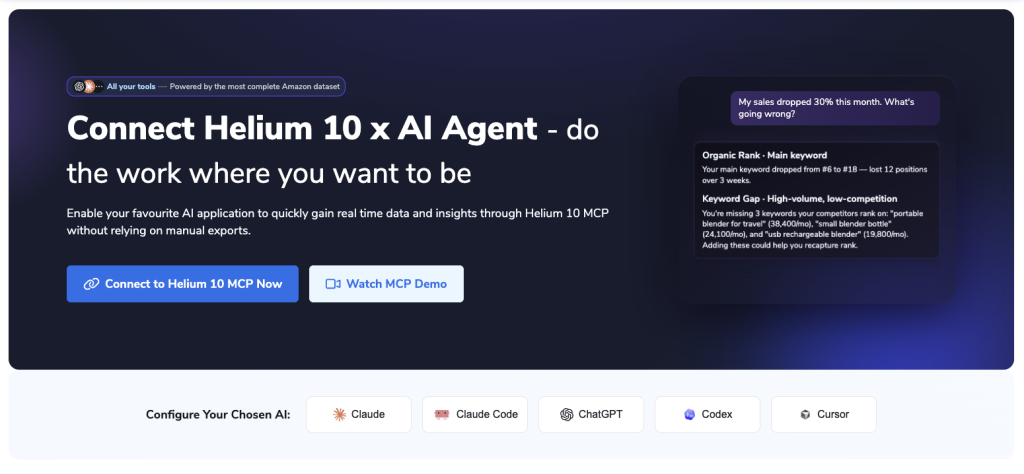
Although the exact interface varies slightly depending on whether you’re using ChatGPT, Claude, or another compatible client, the process is generally the same.
Step 1: Open Your AI Settings
Look for:
- Settings
- Connectors
- Integrations
Depending on the AI platform you’re using.
Step 2: Browse Available Connectors
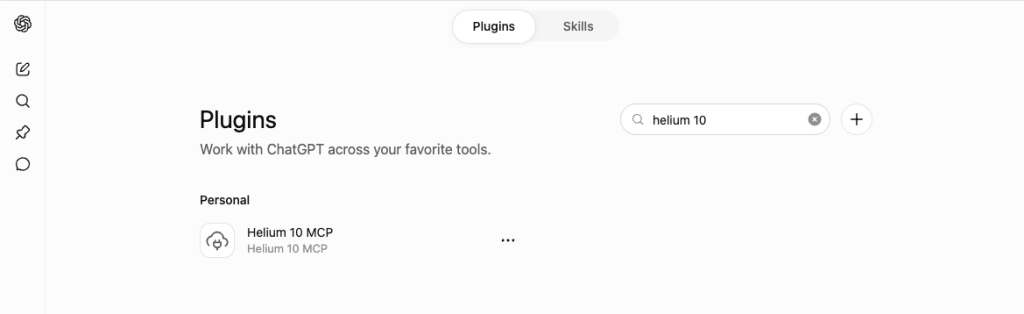
Search for:
Helium 10You should see the official Helium 10 connector.
Step 3: Connect Your Account
Click Connect.
You’ll be redirected to Helium 10.
Sign in if necessary.
Approve the OAuth request.
After authorization, you’ll be sent back to your AI platform.
Step 4: Start Prompting
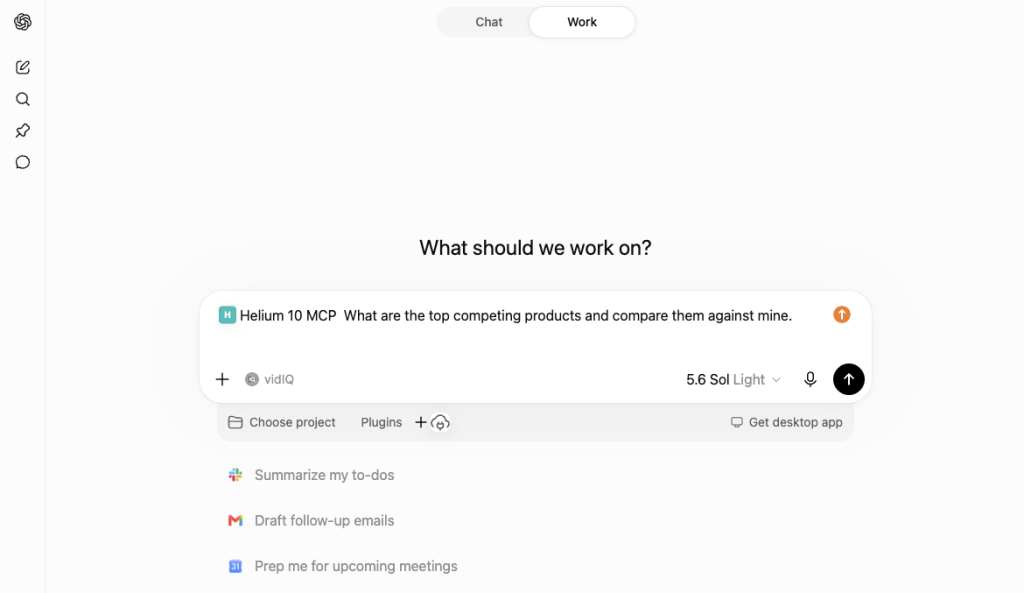
Once connected, you’re ready to start asking questions like:
“Find products under $30 with fewer than 200 reviews.”
or
“Analyze my PPC campaigns and tell me which one is wasting the most budget.”
No imports.
No exports.
No spreadsheets.
One Connection, Hundreds of Possibilities
This is where things start getting really exciting.
Because once MCP is connected…
You’re no longer thinking in terms of Helium 10 tools.
You’re thinking in terms of business questions.
Instead of asking:
“Should I open Cerebro?”
You start asking:
“What keywords am I missing?”
Instead of wondering:
“Should I check Black Box?”
You ask:
“Find me underserved product opportunities.”
That’s a subtle shift.
But it’s a massive productivity boost.
Instead of learning thirty different tools…
You’re simply having a conversation with your business.
Why I Think This Changes the Way We’ll Use Helium 10
For years, Helium 10 has been about helping sellers find better data.
Now it’s becoming about helping sellers make better decisions.
Those are two very different things.
Data by itself doesn’t grow your business.
Decisions do.
MCP shortens the gap between finding information and acting on it.
And I think that’s where its real value lies.
Real-World Workflows That Can Save You Hours Every Week
Now that we’ve covered what Helium 10 MCP is and how to connect it, let’s talk about the part that actually matters.
How can it help you make more money?
At the end of the day, AI is just another tool.
If it doesn’t help you:
- find better products,
- increase profits,
- save time,
- or improve your listings,
then it isn’t worth using.
Fortunately, this is where Helium 10 MCP really starts to shine.
Instead of forcing you to learn dozens of different reports and dashboards, you simply tell AI what you’re trying to accomplish, and it figures out which Helium 10 tools it needs to use.
Let’s look at some of the workflows I think every Amazon seller should start with.
Workflow #1: Find Winning Product Opportunities
Finding a product is usually the most time-consuming part of selling on Amazon.
Traditionally, the process looks something like this:
- Open Black Box
- Experiment with filters
- Analyze hundreds of products
- Open Xray
- Compare sales
- Compare reviews
- Check revenue
- Repeat for hours
With MCP, you can dramatically simplify the process.
Instead of manually configuring dozens of filters, you can simply describe the opportunity you’re looking for.
For example:
Find products in the Kitchen & Dining category that sell more than 1,000 units per month, have fewer than 200 reviews, cost under $25, and have low competition.
Behind the scenes, MCP uses Helium 10’s product research capabilities to return opportunities that match your criteria. (helium10.com)
Why This Is Better Than Traditional Product Research
Most beginners search for products.
Professionals search for criteria.
That’s an important distinction.
Instead of saying:
“Find me a product.”
You can say:
- Find lightweight products
- Find products with high margins
- Find products with low review counts
- Find products with growing demand
- Find products with stable year-round sales
You’re describing the business opportunity rather than guessing individual products.
Example Prompt
Using Helium 10 MCP, find products in the Kitchen & Dining category that:

• Sell over 1,000 units per month
• Have fewer than 200 reviews
• Sell between $25 and $45
• Are not dominated by major brands

Rank them by overall opportunity score.
Imagine how much time that saves compared to manually filtering hundreds of products.
Workflow #2: Analyze Your Competitors
One of the biggest advantages of selling on Amazon is that nearly everything your competitors are doing leaves clues.
The challenge has always been gathering those clues.
With MCP, competitor research becomes much more conversational.
For example:
Compare my product against the top five competitors and tell me where they’re outperforming me.
Instead of opening multiple reports, AI can combine competitor intelligence into a single summary. (helium10.com)
Questions You Can Ask
Instead of manually researching competitors, try asking:
- Which competitor has the fastest sales growth?
- Which competitor owns the most market share?
- Which listings have improved rankings recently?
- Which competitor keywords am I missing?
- Which competitor listings are optimized better than mine?
These aren’t generic AI questions.
They’re business intelligence questions.
Workflow #3: Reverse Engineer Competitor Keywords
I’ve said this many times before.
The fastest way to find profitable keywords isn’t brainstorming.
It’s reverse engineering sellers who are already winning.
Helium 10’s Cerebro has always been one of my favorite tools for this.
Now MCP makes the process even easier.
Instead of manually exporting keyword reports, you can ask:
Compare the keyword strategy of these three competitor ASINs.
The AI can retrieve the keyword data, compare overlap, identify gaps, and summarize the results using Helium 10 data. (helium10.com)
Example Prompt
Compare these three competitor ASINs.

Identify:

• Shared keywords
• Unique keywords
• Highest-volume keywords
• Lowest competition opportunities

Then rank them by launch priority.
That would normally require multiple exports and spreadsheet work.
Now it’s a conversation.
Workflow #4: Discover Your Highest-Converting Keywords
Traffic doesn’t matter if it doesn’t convert.
One of my favorite Helium 10 data sources has always been Search Query Performance because it tells you which keywords actually lead to purchases.
With MCP, you can ask questions like:
Which keywords have the highest conversion rate over the last twelve months?
Instead of manually creating pivot tables, AI summarizes the findings for you using your Search Query Performance data. (helium10.com)
Why This Matters
Many sellers chase high-search-volume keywords.
That’s often a mistake.
Sometimes a keyword with:
- 2,000 monthly searches
will outperform one with:
- 25,000 monthly searches
because it converts significantly better.
MCP helps you identify those opportunities much faster.
Example Prompt
Analyze my Search Query Performance data for the past 12 months.

Show me the keywords that:

• Generated the most purchases
• Have the highest conversion rates
• Outperform the market average
• Still have room for ranking improvements
That’s an incredibly powerful report.
Workflow #5: Find Keywords You’re Losing
One of the easiest ways to lose sales is without even realizing it.
Maybe:
- rankings slipped,
- PPC bids dropped,
- competitors improved,
- or search volume changed.
Most sellers don’t notice until sales decline.
MCP lets you proactively monitor those changes.
Example Prompt
Analyze my Search Query Performance.

Identify keywords that:

• Previously generated strong sales
• Have declined recently
• Lost organic rankings
• Lost sponsored rankings

Recommend actions to recover them.
Now you’re identifying problems before they become expensive.
Workflow #6: Find Hidden Keyword Opportunities
Sometimes the biggest opportunity isn’t finding a new keyword.
It’s recognizing a keyword where you’re already converting exceptionally well.
For example:
Imagine your product is ranking:
Position 92
for a keyword.
Normally you’d ignore it.
But what if customers searching that keyword convert at twice the marketplace average?
That tells you something important.
Those shoppers love your product.
They just aren’t finding it.
That keyword suddenly becomes a high-priority ranking opportunity.
Example Prompt
Show me every keyword where:

• My conversion rate beats the market average
• My organic ranking is below page one
• Search volume exceeds 2,000 monthly searches

Prioritize these by ranking opportunity.
That’s the kind of insight that’s extremely difficult to discover manually.
Workflow #7: Discover Product Gaps
Another workflow I really like is asking AI to identify weaknesses in your product lineup.
For example:
Based on competitor products and customer demand, what adjacent products should I launch next?
Instead of looking at individual products, you’re asking AI to analyze your entire niche.
That helps you build a roadmap instead of chasing random ideas.
Workflow #8: Brainstorm Product Improvements
Launching the same product as everyone else usually leads to one thing:
Price wars.
Instead, use MCP to identify ways to differentiate.
Example:
Analyze reviews from the top five competitors.

Identify:

• Most common complaints
• Missing features
• Frequently requested improvements
• Opportunities for premium positioning
This combines review intelligence with AI analysis to speed up product development.
Workflow #9: Validate Product Ideas Faster
Before spending thousands of dollars on inventory, you want confidence.
MCP can help answer questions like:
- Is this niche growing?
- Is it saturated?
- Are reviews increasing?
- Is demand seasonal?
- Are brands dominating?
Instead of opening five separate reports, you simply ask.
Workflow #10: Build Your Weekly Amazon Business Report
This might end up being one of my favorite long-term uses.
Imagine scheduling AI to generate a weekly business summary.
For example:
Create my weekly Amazon business report.

Include:

• Sales trends
• Keyword movement
• PPC performance
• Competitor changes
• Lost keyword rankings
• New opportunities
• Recommended actions
Instead of checking multiple dashboards every Monday morning…
You start your week with a single report.
That’s a huge productivity improvement.
The Real Power Isn’t the Prompts
A lot of people focus on prompts.
Personally, I think that’s missing the bigger picture.
The real value isn’t memorizing clever prompts.
The real value is changing how you think about your business.
Instead of asking:
“Which Helium 10 tool should I open?”
You start asking:
- Where am I losing money?
- Which keywords deserve more budget?
- Which products have the highest upside?
- Which competitors should I monitor?
- What should I improve next?
Those are business questions.
And that’s exactly what AI is becoming good at answering when it’s connected to the right data.
Advanced Helium 10 MCP Workflows That Can Transform Your Amazon Business
By now, you can probably see that Helium 10 MCP is much more than a shortcut for product research.
Once you start thinking beyond simply asking for keyword lists or product ideas, you’ll realize that MCP can become your own personal Amazon business analyst.
Instead of spending hours switching between Helium 10 tools trying to piece everything together yourself, you can have AI combine information from multiple data sources and present it in a way that’s easy to understand.
This is where I think experienced Amazon sellers are going to get the biggest return on investment.
Let’s look at some of my favorite advanced workflows.
Workflow #11: Build Better PPC Campaigns
One of the biggest mistakes I see sellers make is treating every keyword the same.
They’ll export a list of hundreds of keywords, dump them into a single campaign, set one bid, and hope Amazon figures it out.
That’s not a strategy.
That’s gambling.
A good PPC strategy separates keywords into different campaigns based on intent, performance, and competition.
Helium 10 MCP can help you identify those differences much faster.
Example Prompt
Analyze my PPC campaigns.

Identify:

• Keywords wasting ad spend
• Keywords with high ACoS
• Keywords with low impressions
• Keywords with strong conversion rates
• Keywords that deserve higher bids

Then recommend campaign restructuring.
Instead of spending an hour digging through advertising reports, AI summarizes everything for you.
Workflow #12: Find Negative Keywords Automatically
Negative keywords are one of the easiest ways to improve profitability.
The problem?
Finding them manually takes forever.
Instead, ask MCP something like:
Review my search term reports.

Identify search terms that:

• Have spent over $50
• Generated zero sales
• Have poor click-through rates

Recommend which should become negative exact or negative phrase keywords.
That’s exactly the kind of repetitive work AI excels at.
Workflow #13: Rebuild an Amazon Listing
One workflow that really impressed me is using MCP together with Helium 10’s Listing Builder.
Instead of manually gathering keywords, copying them into AI, writing your listing, and then checking keyword coverage…
You can do everything inside one conversation.
For example:
Using my keyword bank, create:

• Amazon Title
• Five optimized bullet points
• Product description
• Backend search terms

Follow Amazon style guidelines and naturally incorporate my highest-priority keywords.
Since MCP has access to your keyword research, the AI isn’t writing blindly.
It’s writing based on actual search data. (helium10.com)
Workflow #14: Improve an Existing Listing
You don’t always need to create a new listing.
Sometimes improving your current listing is enough to dramatically increase conversions.
Try asking:
Analyze my listing.

Compare it against the top five competitors.

Tell me:

• Missing keywords
• Weak bullet points
• Weak title
• Missing selling points
• Opportunities to improve conversion
That’s essentially combining Listing Analyzer, Cerebro, and competitor research into one conversation.
Workflow #15: Optimize Your Product Size Tier
This is one workflow I don’t think enough sellers pay attention to.
Amazon’s FBA fees are heavily influenced by product dimensions.
Sometimes reducing a package by less than an inch can move it into a completely different size tier.
That could mean saving several dollars on every single sale.
Imagine selling:
10 units per day
and saving:
$3 per unit.
That’s:
$30 every day.
Over:
$900 per month.
Simply by changing packaging dimensions.
Example Prompt
Review my product dimensions.

Determine whether changing:

• Length
• Width
• Height
• Weight

could reduce my FBA fees.

Estimate the annual savings.
That’s the type of opportunity many sellers never even think to look for.
Workflow #16: Monitor Your Market Automatically
One of my favorite Helium 10 tools has always been Market Tracker.
Instead of occasionally checking competitors…
Why not let AI summarize what’s happening?
For example:
Review my market.

Identify:

• New competitors
• Fast-growing competitors
• Declining competitors
• Market share changes
• Pricing trends
Instead of manually checking dashboards every week…
You receive a concise business summary.
Workflow #17: Weekly Competitor Intelligence
Imagine receiving this every Monday morning:
| Metric | Status |
|---|---|
| New Competitors | 3 |
| Lost Rankings | 4 Keywords |
| Biggest Winner | Brand XYZ |
| Highest Sales Growth | +18% |
| Price Changes | 7 Listings |
| New Opportunities | 5 |
That’s a report I’d actually read every week.
Workflow #18: Profitability Analysis
Revenue is exciting.
Profit is what matters.
One thing I appreciate about Helium 10 is that it tracks far more than just sales.
With MCP, you can ask questions like:
Analyze my profitability.

Show me:

• Highest profit products
• Lowest profit products
• Highest Amazon fees
• Biggest margin opportunities
Now you’re making decisions based on profit instead of vanity metrics.
Workflow #19: Inventory Planning
Running out of inventory is expensive.
Overordering is expensive.
Finding the right balance is difficult.
AI can help identify patterns much faster than manually reviewing inventory reports.
Example prompt:
Review my inventory.

Identify:

• Products likely to stock out
• Slow-moving inventory
• Overstocked products
• Suggested reorder priorities
This becomes especially valuable if you’re managing dozens or even hundreds of SKUs.
Workflow #20: Identify Seasonal Trends
Seasonality catches a lot of new sellers off guard.
Instead of asking:
“Is this seasonal?”
You can ask something much more useful.
Analyze the past three years.

Show me:

• Monthly sales trends
• Seasonal spikes
• Seasonal declines
• Inventory recommendations
Now you can plan inventory before your competitors.
Workflow #21: Build a Complete Launch Strategy
One of my favorite prompts would be something like this:
Create a launch strategy for this product.

Include:

• Keyword priorities
• PPC strategy
• Competitor analysis
• Pricing recommendations
• Inventory recommendations
• Listing improvements
Instead of receiving isolated pieces of advice…
You receive an actual launch roadmap.
My Favorite Daily Prompts
If I were using Helium 10 MCP every single day, these would probably become part of my routine.
| Morning Prompt | Purpose |
|---|---|
| What changed overnight? | Daily summary |
| Which keywords lost rank? | SEO monitoring |
| Which PPC campaigns need attention? | Advertising |
| Which competitors gained market share? | Competitor analysis |
| Which products deserve more inventory? | Inventory |
My Favorite Weekly Prompts
Every week I’d probably ask:
- What’s my biggest opportunity this week?
- What is costing me the most money?
- Which keywords should I focus on?
- Which products deserve additional inventory?
- Which competitors changed pricing?
- Which campaigns should I increase budget on?
Instead of opening ten different reports…
I’d have one conversation.
What I Like Most About MCP
The biggest benefit isn’t necessarily that it saves time.
Although it absolutely does.
The biggest benefit is that it changes how you think.
Instead of learning dozens of reports…
You simply describe the problem you’re trying to solve.
For example:
Instead of saying:
“I should check Keyword Tracker.”
You say:
“Why did my sales drop?”
Instead of saying:
“I should open Cerebro.”
You say:
“Which keywords am I missing?”
Instead of saying:
“I need Listing Analyzer.”
You ask:
“How can I improve my conversion rate?”
You’re focusing on outcomes rather than tools.
And I think that’s exactly where AI should be helping.
Where MCP Still Doesn’t Replace Experience
As excited as I am about Helium 10 MCP, I don’t think it replaces experience.
It won’t magically turn a bad product into a winning product.
It won’t eliminate the need for critical thinking.
It won’t make every recommendation perfect.
You still need to:
- Validate opportunities
- Understand your niche
- Analyze competitors
- Test different strategies
- Use good business judgment
Think of MCP as an incredibly knowledgeable assistant.
It can gather data.
It can identify patterns.
It can save hours of work.
But ultimately, you’re still the one making the decisions.
Best Practices for Getting the Most Out of Helium 10 MCP
Like any AI tool, the quality of your results depends on the quality of your questions.
One of the biggest mistakes beginners make is asking vague questions like:
“Find me a product.”
That’s far too broad.
Instead, give the AI context.
The more specific you are, the better your results will be.
For example, instead of asking:
Find me a product.
Ask something like:
Find products in the Home & Kitchen category that sell at least 1,500 units per month, have fewer than 150 reviews, sell for between $25 and $45, are lightweight, and aren’t dominated by recognizable brands.
Now the AI knows exactly what you’re looking for.
Think Like a Business Owner, Not a Software User
One thing I really like about Helium 10 MCP is that it changes how you interact with your business.
Instead of thinking:
Which tool do I need?
You start thinking:
Which problem am I trying to solve?
That’s a huge shift.
For years we’ve had to learn where every feature lives inside Helium 10.
Need keywords?
Open Cerebro.
Need product ideas?
Open Black Box.
Need listing optimization?
Open Listing Builder.
Need Search Query Performance?
Open Search Query Analyzer.
Now, instead of remembering which tool does what, you simply ask the question that’s already in your head.
For example:
- Why are my sales down this week?
- Which keywords deserve more PPC budget?
- Which competitors are growing the fastest?
- Where am I losing organic rank?
- Which products should I launch next?
The AI figures out which Helium 10 data it needs to answer those questions.
That’s a much more natural way to work.
What Helium 10 MCP Doesn’t Do
As exciting as this technology is, it’s important to have realistic expectations.
MCP isn’t a magic button that automatically grows your Amazon business.
It doesn’t replace experience.
It doesn’t replace testing.
And it certainly doesn’t replace good business decisions.
Here’s what it doesn’t do:
| It Doesn’t… | Why |
|---|---|
| Automatically create winning products | You still need product validation |
| Replace customer research | You still need to understand your audience |
| Automatically optimize PPC | It recommends changes, but you make the final decisions |
| Guarantee higher rankings | Rankings still depend on your product, competition, pricing, reviews, and sales velocity |
| Replace Helium 10 | It enhances Helium 10—it doesn’t replace it |
Think of MCP as an incredibly knowledgeable business analyst.
It can gather data, connect the dots, identify trends, and recommend actions.
But you’re still the CEO.
My Recommended Daily Workflow
If I were starting my day as an Amazon seller using Helium 10 MCP, here’s exactly how I’d use it.
Step 1: Get a Morning Business Summary
Prompt:
Summarize everything important that changed in my Amazon business since yesterday.

Include:

• Sales
• Rankings
• PPC
• Competitors
• Inventory
• Opportunities
Step 2: Check Keyword Opportunities
Prompt:
Show me the keywords where:

• My conversion rate beats the market
• My ranking is below page one
• Search volume exceeds 2,000 monthly searches
Step 3: Review PPC
Prompt:
Review all PPC campaigns.

Show me:

• Highest ACoS
• Lowest ACoS
• Best ROAS
• Campaigns needing attention
Step 4: Watch Competitors
Prompt:
Compare my listing against my top five competitors.

Highlight:

• New keywords
• New products
• Pricing changes
• Market share changes
Step 5: Ask One Strategic Question
This is where I’d spend the majority of my time.
Instead of looking at reports…
I’d simply ask something like:
What’s the biggest opportunity in my business right now?
Sometimes the answer might surprise you.
50 Ready-to-Use Helium 10 MCP Prompts
One of the biggest advantages of MCP is that you don’t have to figure everything out on your own. Below are prompts you can copy, customize, and use as a starting point.
Product Research
- Find products with high demand and low competition in the Home & Kitchen category.
- Show products selling over 1,000 units per month with fewer than 200 reviews.
- Find products priced between $20 and $40 with healthy profit margins.
- Identify niches where review counts are low but sales remain strong.
- Find products with consistent year-round demand.
- Show opportunities that aren’t dominated by large brands.
- Identify products with growing search demand over the last 12 months.
- Recommend complementary products I could launch alongside my existing catalog.
Competitor Analysis
- Compare my product against my top five competitors.
- Show where my competitors outrank me organically.
- Identify competitor keywords I’m not targeting.
- Compare pricing strategies across the top listings.
- Identify listings with stronger conversion rates.
- Show which competitors are gaining market share the fastest.
- Summarize the strengths and weaknesses of my top competitors.
- Highlight recent changes in competitor rankings.
Keyword Research
- Show my highest-converting keywords.
- Find keywords where my conversion rate beats the market average.
- Identify keywords I’m ranking for that deserve additional PPC budget.
- Show keyword gaps between my listing and my competitors.
- Group my keywords by search intent.
- Identify long-tail keywords with low competition.
- Recommend keyword clusters for future content and listings.
- Prioritize keywords based on traffic and conversion potential.
Listing Optimization
- Rewrite my title using my highest-value keywords.
- Rewrite my bullet points for better conversions.
- Optimize my backend search terms.
- Compare my listing against Amazon’s best-performing listings.
- Identify missing keywords in my content.
- Suggest improvements to increase click-through rate.
- Improve my product description while maintaining readability.
- Highlight areas that could improve conversion.
PPC
- Identify keywords wasting ad spend.
- Recommend negative keywords.
- Suggest bid adjustments based on conversion data.
- Identify underfunded campaigns with strong performance.
- Find keywords with high impressions but low click-through rates.
- Recommend campaign restructuring.
- Identify profitable keywords that should be isolated into exact match campaigns.
- Prioritize keywords for increased advertising investment.
Inventory & Profitability
- Forecast products likely to stock out.
- Identify slow-moving inventory.
- Recommend reorder priorities.
- Estimate the financial impact of reducing FBA fees.
- Identify products with shrinking profit margins.
- Show my highest-margin products.
- Recommend ways to improve profitability.
- Highlight inventory risks before peak season.
Business Strategy
- What’s the single biggest opportunity in my business right now?
- What’s costing me the most money?
- Which product deserves my attention first?
- What should my priorities be over the next 30 days?
- If you were running my Amazon business, what would you focus on first?
- Summarize my biggest wins and biggest risks this month.
Final Thoughts
I’ve been using AI in my Amazon business for quite a while now, and it’s already become one of the most valuable tools in my daily workflow. Whether I’m brainstorming ideas, organizing data, writing content, or analyzing competitors, AI has saved me an incredible amount of time.
But until recently, there was always one major limitation.
AI only knew what I told it.
If I wanted it to analyze keyword rankings, I had to export keyword rankings.
If I wanted help with PPC, I had to export PPC reports.
If I wanted competitor analysis, I had to manually gather competitor data first.
The AI itself wasn’t the bottleneck—the lack of access to live business data was.
That’s why I think Helium 10 MCP is such a significant step forward.
Instead of acting like a general-purpose chatbot, AI becomes an intelligent assistant that can work with your Helium 10 marketplace intelligence to help answer real business questions. Rather than spending your time collecting data, you can spend it making decisions.
Will it replace experience?
No.
Will it replace Helium 10?
Absolutely not.
In my opinion, it actually makes Helium 10 even more valuable because it lowers the barrier to using all of that data effectively.
For beginners, it means you don’t need to memorize where every report lives before you can start getting useful insights.
For experienced sellers, it means you can spend less time navigating dashboards and more time acting on opportunities.
And that’s really what excites me the most.
The future of Amazon selling isn’t about having access to more data.
It’s about turning that data into better decisions—faster than ever before.
If you’re already using Helium 10, I highly recommend taking a few minutes to connect MCP and start experimenting with it. Try some of the prompts in this guide, customize them for your own products, and see how it fits into your workflow.
I think you’ll quickly discover, just like I did, that once you start having conversations with your Amazon business instead of digging through reports, it’s hard to imagine going back.