Create an Optimized Amazon Product Listing to Rank #1: The Complete Amazon SEO Guide (2026)
If you want to rank higher on Amazon, generate more organic traffic, and increase your sales, simply creating a product listing isn’t enough.
One of the biggest misconceptions I see new Amazon sellers make is believing that once they publish a product, collect a few reviews, and turn on some PPC campaigns, the sales will magically start rolling in.
Unfortunately, that’s not how Amazon works.

If your listing isn’t properly optimized, shoppers won’t be able to find your product. And if customers can’t find your listing, they can’t buy it—no matter how great your product is.
The good news?
Amazon SEO isn’t nearly as complicated as it seems once you understand how Amazon’s search algorithm works and, more importantly, how to use the right tools to optimize your listing.
Throughout this guide, I’ll walk you through the exact process I use to optimize Amazon listings from start to finish. I’ll also show you how I use several Helium 10 tools—including Cerebro for reverse ASIN keyword research, Listing Builder for creating keyword-optimized product listings, Index Checker to verify Amazon is indexing my keywords correctly, and Keyword Tracker to monitor rankings over time. These are the same tools I personally rely on when researching new products, optimizing listings, and launching products on Amazon.
By the end of this guide, you’ll know how to:
- Understand how Amazon’s search algorithm ranks products
- Perform professional keyword research using real Amazon search data
- Find the exact keywords your top competitors are ranking for
- Build an SEO-optimized listing that also converts shoppers into buyers
- Properly structure your title, bullet points, description, and backend search terms
- Verify that Amazon has indexed your most important keywords
- Track your keyword rankings and monitor your progress over time
- Avoid the common SEO mistakes that prevent listings from reaching page one
If you’re serious about growing your Amazon business, I highly recommend using Helium 10 throughout this process. It saves countless hours of manual research and gives you access to data that simply isn’t available through free keyword tools. I’ve also have an exclusive discount here, so you can follow along using the same tools I’m using.
Let’s dive in.
What Is Amazon Listing Optimization?
Amazon listing optimization is made up of two completely different goals.
| Amazon SEO | Conversion Optimization |
|---|---|
| Helps customers find your product | Helps customers buy your product |
| Optimizes for Amazon’s algorithm | Optimizes for real shoppers |
| Uses keyword research | Uses persuasive copywriting |
| Improves rankings | Improves conversion rate |
Many sellers focus on only one side.
That’s a huge mistake.
Imagine ranking #1 for every keyword but having terrible images and boring copy.
You’ll get traffic…
…but nobody buys.
Now imagine having the best listing on Amazon—but nobody ever sees it.
Same problem.
The sellers who dominate Amazon combine both.
- Strong SEO
- Strong conversions
That’s where the magic happens.
Understanding Amazon’s A9 Algorithm
Before you optimize anything, you need to understand what Amazon actually wants.
Amazon’s search engine (commonly referred to as the A9 Algorithm) has one primary goal:
Make Amazon more money.
That’s it.
Whenever someone searches for a product, Amazon asks itself:
Which products are most likely to generate a sale?
Amazon generally looks at two major factors.
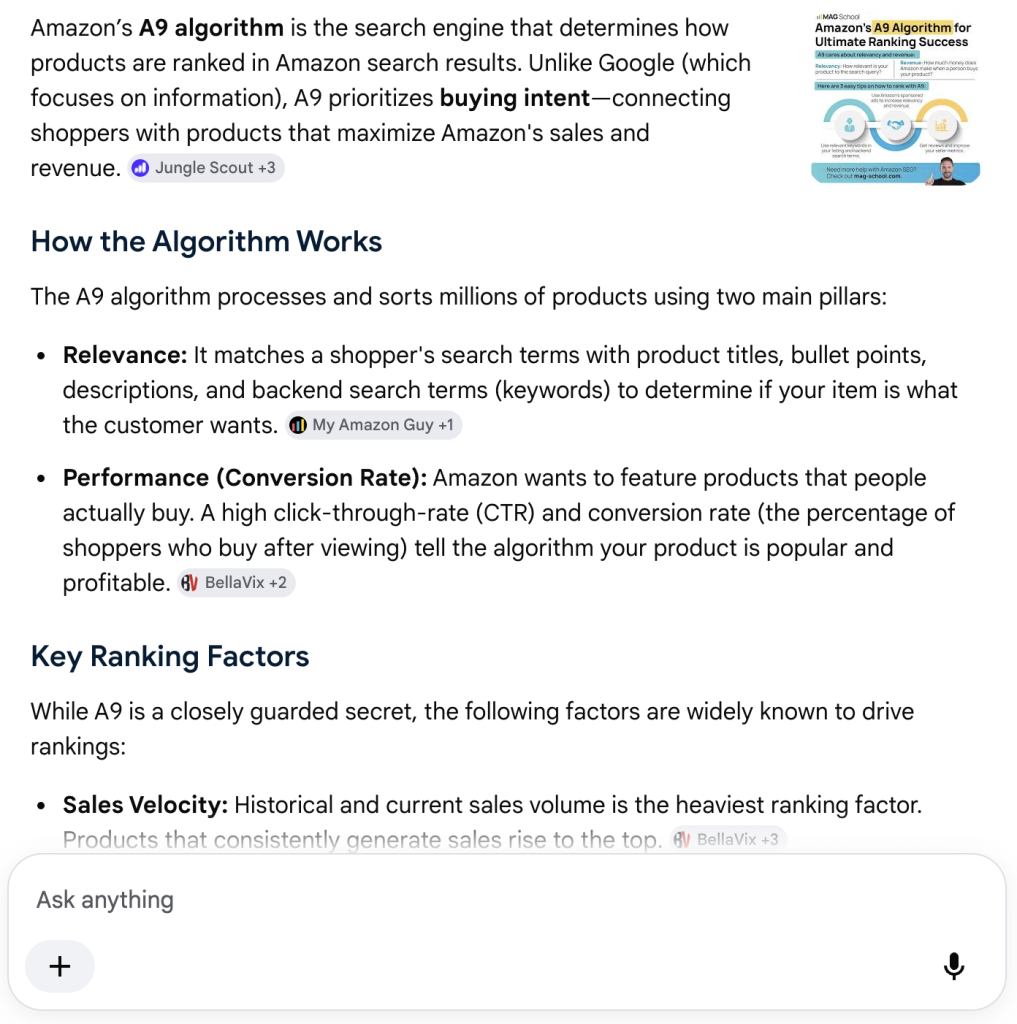
1. Keyword Relevancy
Does your listing match what the customer searched?
For example:
Customer searches:
Screw in tent stakes
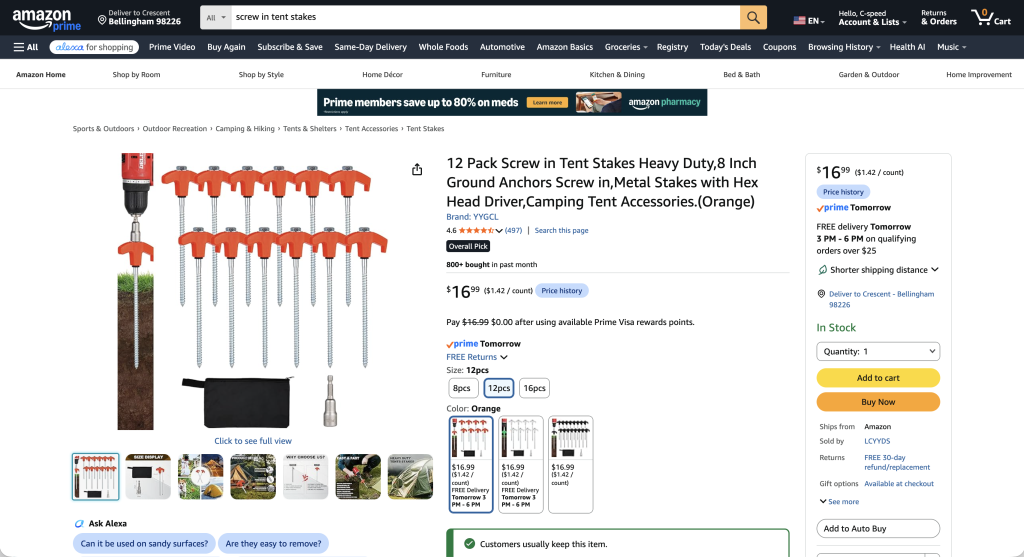
Amazon checks whether your listing includes phrases like:
- Screw in tent stakes
- Tent anchors
- Ground anchors
- Camping stakes
The better your keyword relevance…
…the more likely Amazon is to show your listing.
2. Sales Performance
Amazon also asks:
When shoppers see this listing…do they actually buy it?
If they do:
- Higher rankings
- More impressions
- More organic traffic
If they don’t:
- Rankings slowly decline
Amazon rewards products that convert.
Why Keyword Research Is So Important
Here’s something every new seller should understand:
You cannot directly control sales.
But…
You can control your keywords.
That makes keyword research one of the highest ROI activities you can do.
Unfortunately, this is also where most beginners fail.
Common mistakes include:
- Guessing keywords
- Using Google keyword tools
- Copying competitors blindly
- Stuffing random keywords into listings
None of those strategies work consistently.
Amazon SEO vs Google SEO
Many beginners assume Google keyword research works on Amazon.
It doesn’t.
Here’s why.
| Amazon | |
|---|---|
| Informational searches | Buying searches |
| “How to clean camping gear” | “Tent stakes” |
| “Best camping tents” | “Heavy duty tent anchors” |
| Users want answers | Users want products |
Google users are researching.
Amazon users have their wallets out.
That’s why Amazon-specific keyword tools are essential.
Step 1: Build a Professional Keyword Strategy
This is where everything starts.
Instead of guessing…
We’re going to reverse engineer products already making money.
Why Reverse ASIN Research Works
Rather than asking:
What keywords should I use?
Ask:
What keywords are already generating sales for my competitors?
That’s exactly what reverse ASIN lookup does.
Instead of brainstorming…
You’re using proven Amazon search data.
Find Your Top Competitors
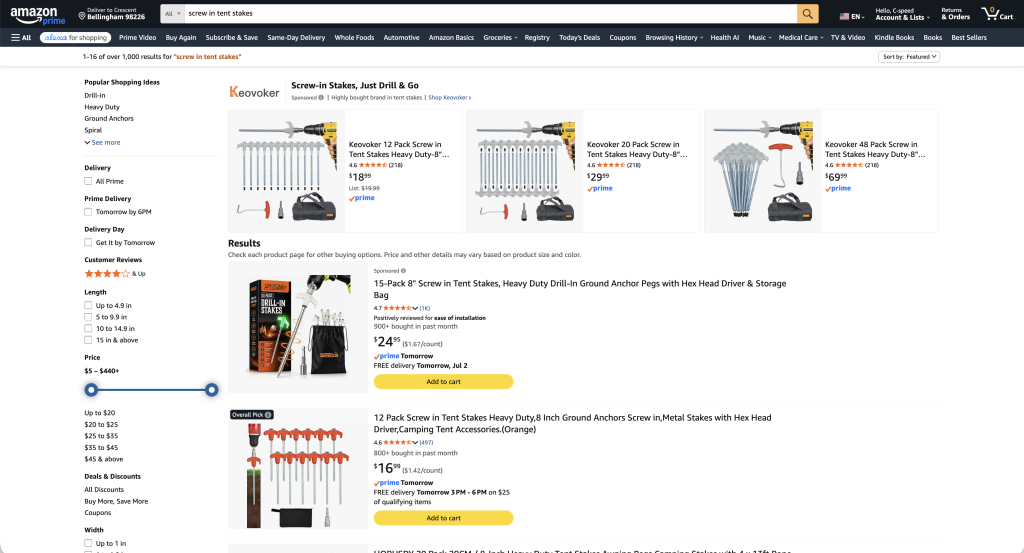
Search Amazon using your primary keyword.
Example:
Screw in tent stakes
Choose the top organic listings.
Avoid:
- Sponsored listings
- Unrelated products
- Variations that aren’t comparable
Generally, collect:
- Top 3 ASINs for high-volume products
- Top 5–6 ASINs for lower-volume niches
Import Competitors into Cerebro
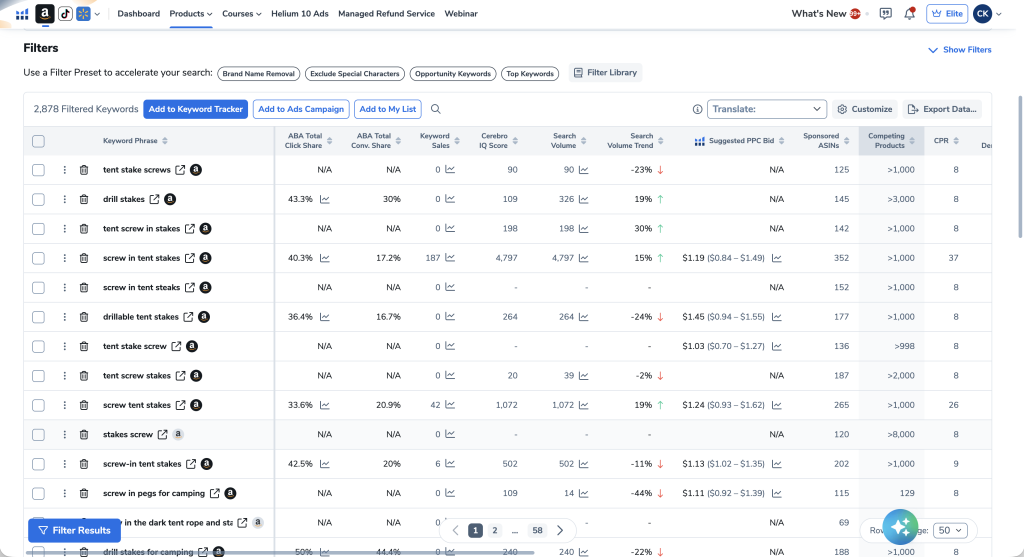
Now, we’re going to use Helium 10’s Cerebro tool to discover which keywords your competitors are already ranking for. Once you’ve collected the ASINs:
- Open Cerebro.
- Paste each ASIN in order.
- Run the search.
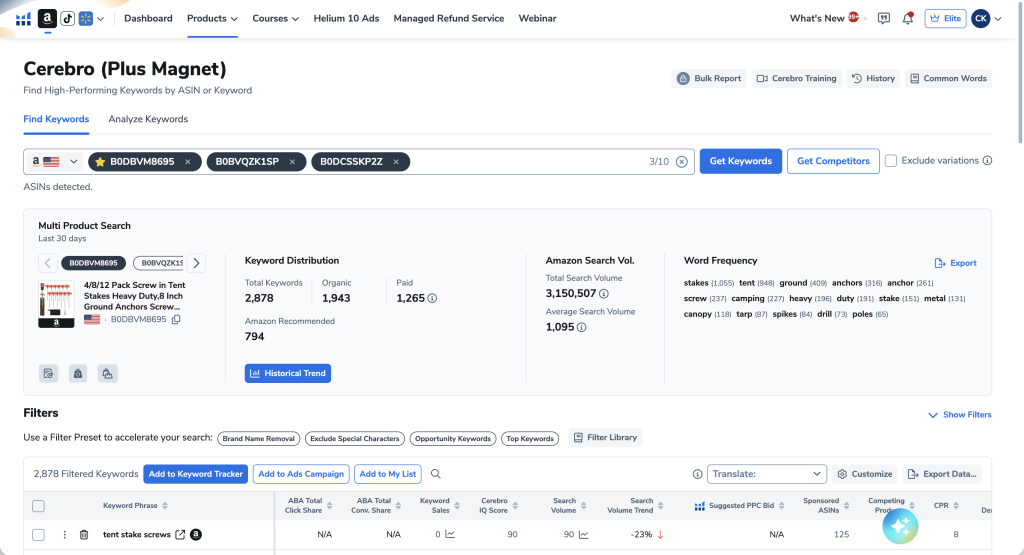
Immediately you’ll receive thousands of keywords.
That’s too many.
Time to filter.
Recommended Cerebro Filters
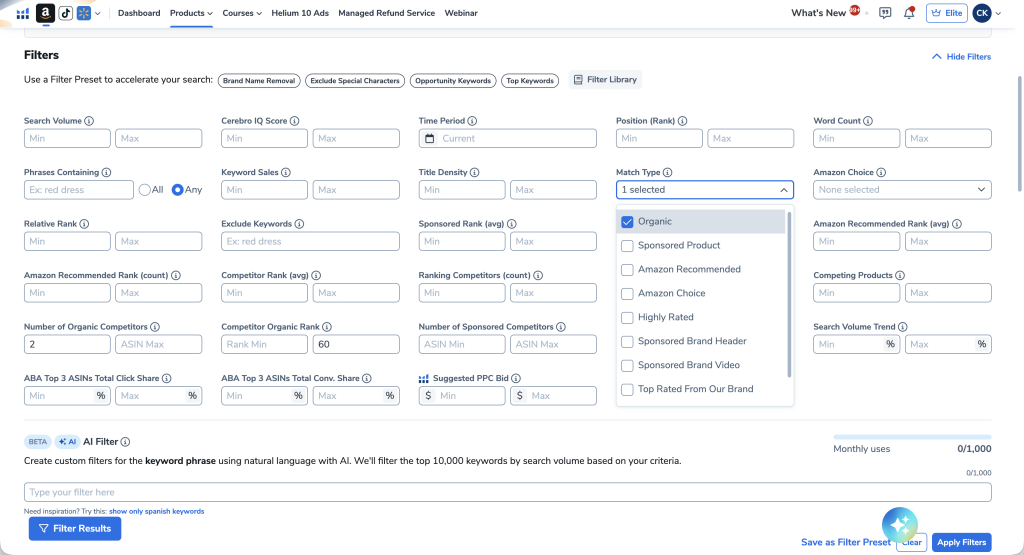
These filters dramatically improve keyword quality.
| Filter | Recommended Value |
|---|---|
| Match Type | Organic |
| Competitor Rank | Maximum 60 |
| Competitors Ranking | Minimum 2 |
These filters remove:
- Low-quality keywords
- Irrelevant phrases
- Weak search terms
You’re left with only keywords multiple successful competitors rank for.
Remove Bad Keywords
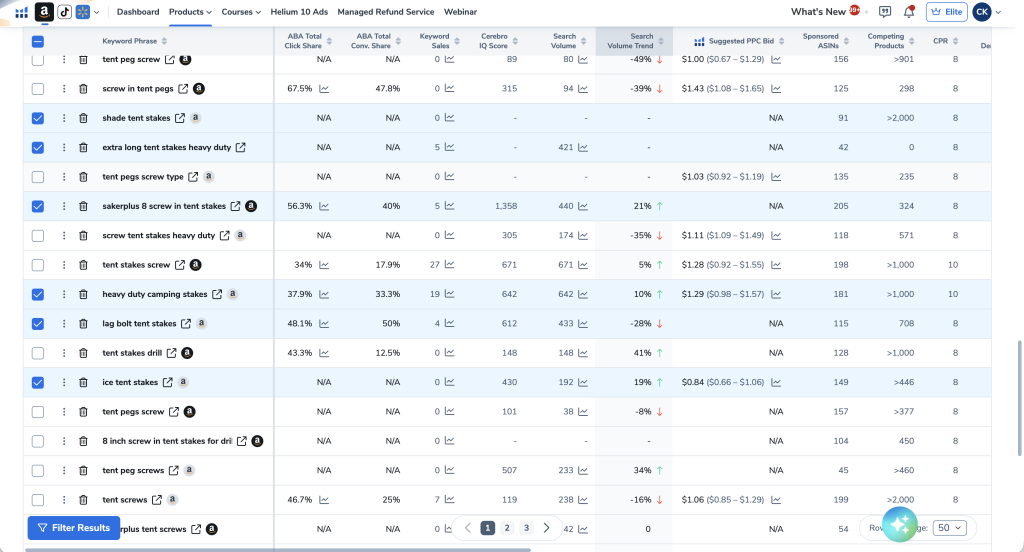
Go through the list and delete:
- Brand names
- Competitor brands
- Irrelevant phrases
- Wrong products
If you’re unsure about a keyword:
Hover over it.
Check which products appear.
If they aren’t your product…
Delete it.
Create Multiple Keyword Lists
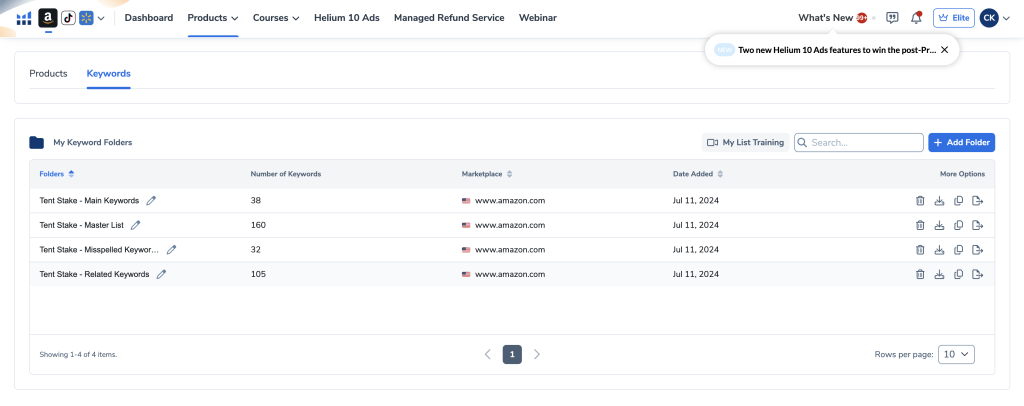
This is one of the biggest differences between beginners and experienced sellers.
Don’t keep one giant keyword list.
Organize them.
I typically create four seperate keyword lists. Save each keyword list in Helium 10’s Keyword List.
| Folder | Purpose |
|---|---|
| Master Keywords | Every relevant keyword |
| Main Keywords | Highest-intent buying keywords |
| Related Keywords | Similar or broader searches |
| Misspelled Keywords | Common Amazon typos |
This organization becomes incredibly valuable later for both SEO and PPC.
Expand Your Keyword List
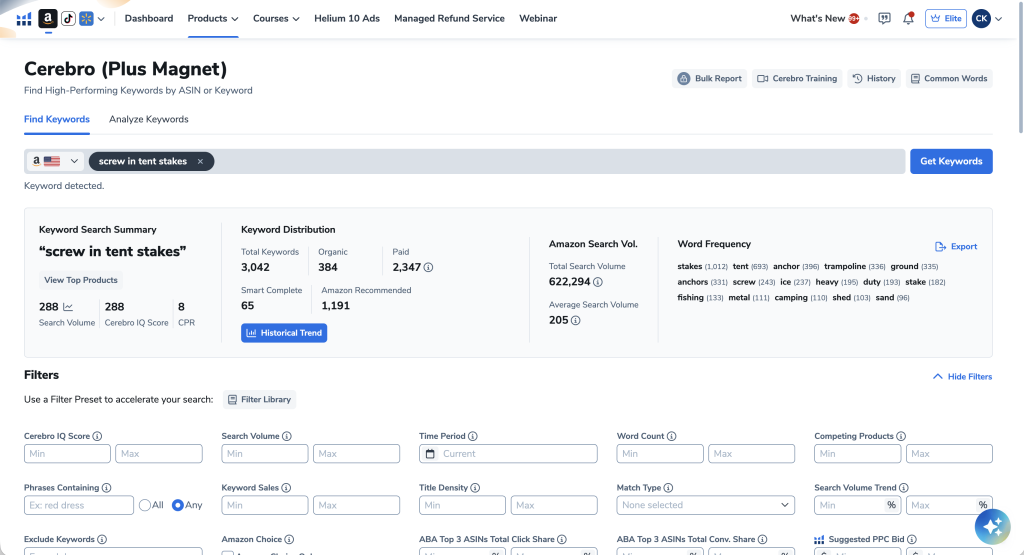
Now take your #1 keyword.
Run another keyword search.
Why?
Reverse ASIN research doesn’t find everything.
Running keyword discovery from your top keyword uncovers additional search terms.
Repeat your cleanup process.
Add new keywords into the appropriate folders.
Find High-Intent Misspelled Keywords
Here’s an advanced strategy many sellers overlook.
Amazon shoppers misspell products all the time.
Examples:
- Tent staks
- Tent ancor
- Screw in pegs
These searches still generate sales.
Using AI, you can quickly generate:
- Common spelling mistakes
- High-intent typos
- Alternative phrasing
Import these into your misspelled keyword folder for future PPC campaigns and backend keyword opportunities.
Why Separate Keyword Lists Matter
Think of PPC like running experiments.
If everything is dumped into one campaign:
- You can’t analyze data.
- You can’t optimize bids.
- You can’t identify winners.
Separate keyword lists create cleaner data.
Cleaner data leads to better decisions.
Better decisions create better profits.
Step 2: Build an SEO-Optimized Amazon Listing
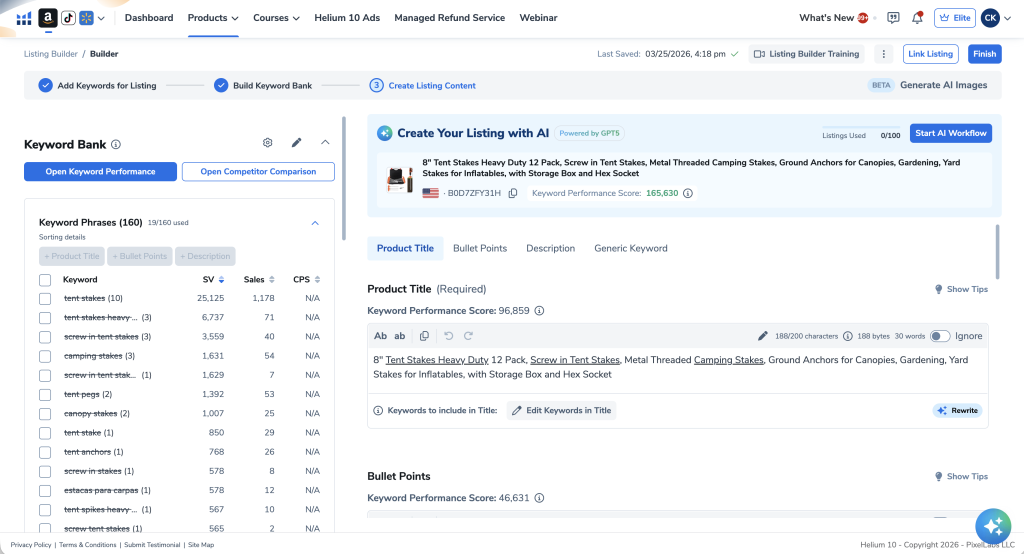
Now it’s time to turn keywords into a listing and we’re going to use another powerful Helium 10 tool called Listing Builder.
This is where SEO meets conversion optimization.
Your goal is to:
- Use important keywords
- Keep the listing readable
- Convince customers to buy
Never sacrifice readability just to cram in keywords.
With Helium 10 Listing Builder, you can optimize keyword word usage and placement. Simple import your Master Keyword list and Listing Builder will help you create a keyword optimized product listing.
As you create your listing copy, keywords you’ve used will automatically be removed from the Keyword Bank.
Optimizing Your Product Title
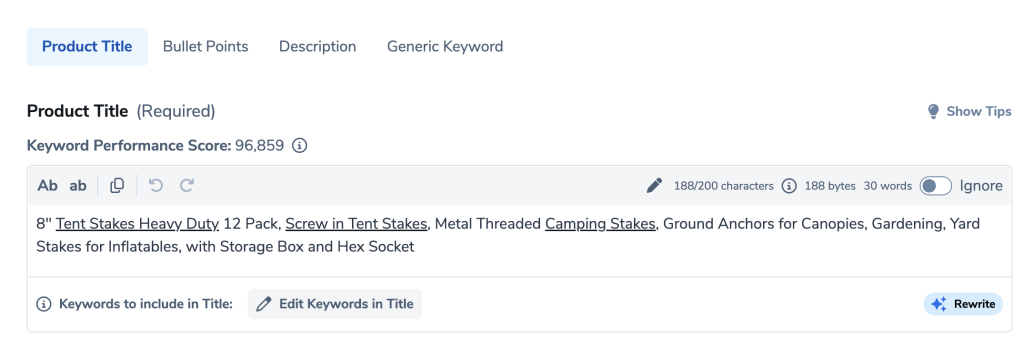
Your title is the most important field on your listing.
Why?
Because Amazon gives the title the most keyword weight.
Even more importantly…
Keywords closer to the beginning of the title generally carry more importance.
A simple structure looks like this:
Main Keyword → Important Features → Size → Quantity → Benefits
Example:
Heavy Duty Screw In Tent Stakes – 8 Pack Camping Ground Anchors for Sand, Dirt & Grass
Notice the highest-value keyword appears immediately.
Title Best Practices
- Lead with your main keyword
- Keep it readable
- Don’t keyword stuff
- Stay within Amazon’s character limits
- Include major features naturally
Bullet Points That Convert
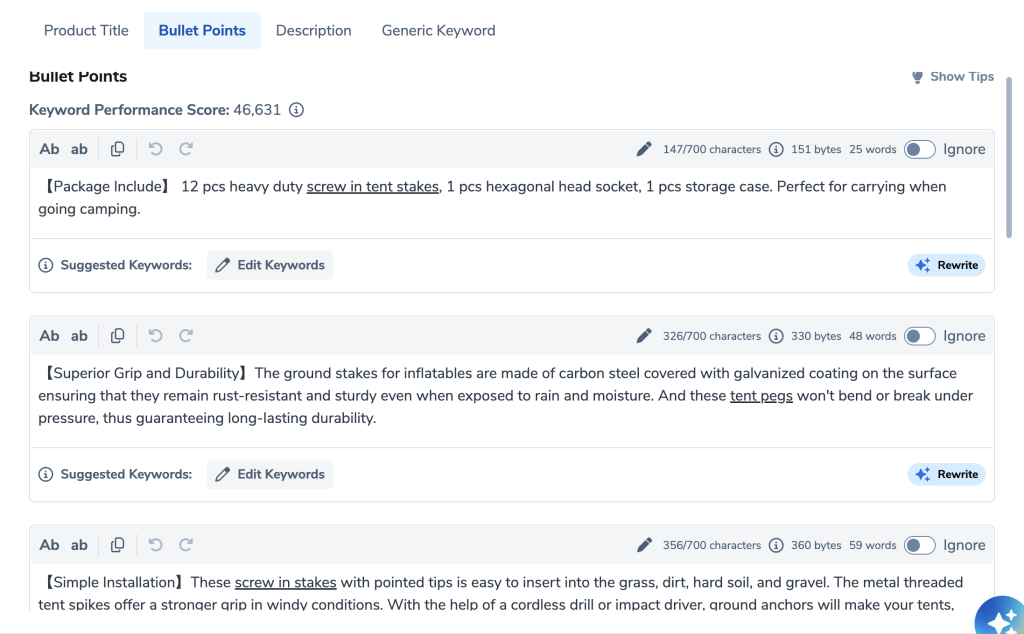
Your bullets shouldn’t just describe features.
They should solve problems.
A good formula is:
Problem → Solution → Benefit
Example:
❌ Stainless steel construction.
Better:
✅ Rust-resistant stainless steel construction keeps your tent securely anchored even during heavy winds and rainy conditions.
Great Bullet Points Should
- Address customer pain points
- Explain benefits
- Include keywords naturally
- Be easy to scan
Remember:
Long paragraphs scare buyers away.
Simple wins.
Product Description
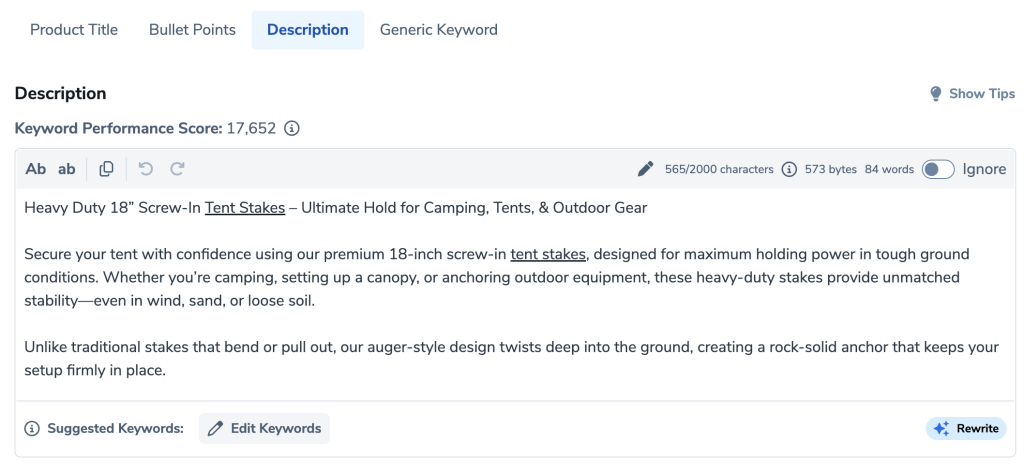
Your description expands on your bullet points.
This is where you:
- Tell your brand story
- Explain use cases
- Reinforce benefits
- Build trust
Again…
Write for humans first.
Amazon second.
Backend Search Terms
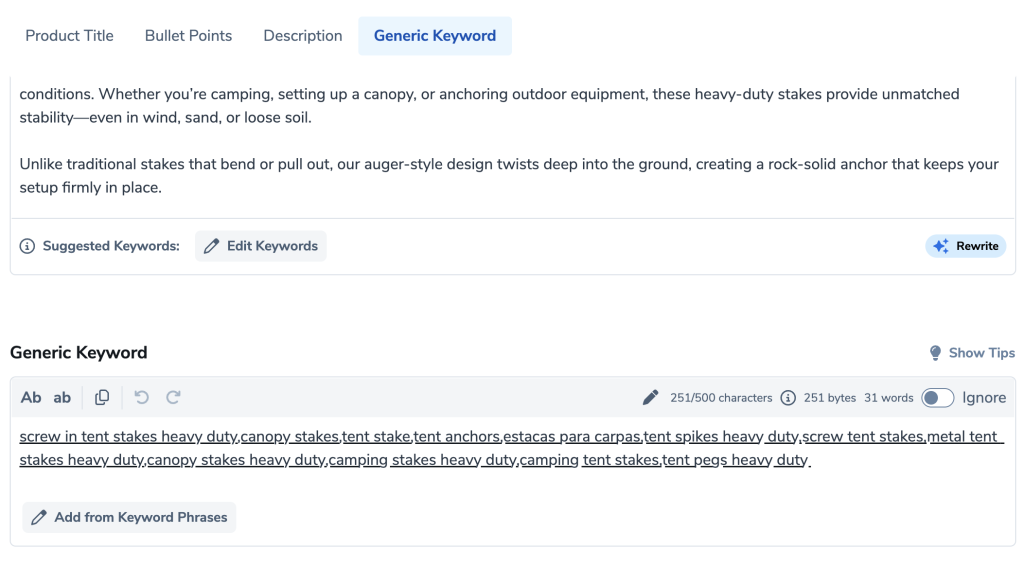
Amazon also provides hidden keyword fields.
These aren’t visible to shoppers.
Perfect place for:
- Remaining keywords
- Alternate wording
- Misspellings
- Synonyms
Don’t waste space repeating keywords already used.
Use this section strategically.
Step 3: Create the Listing Inside Seller Central
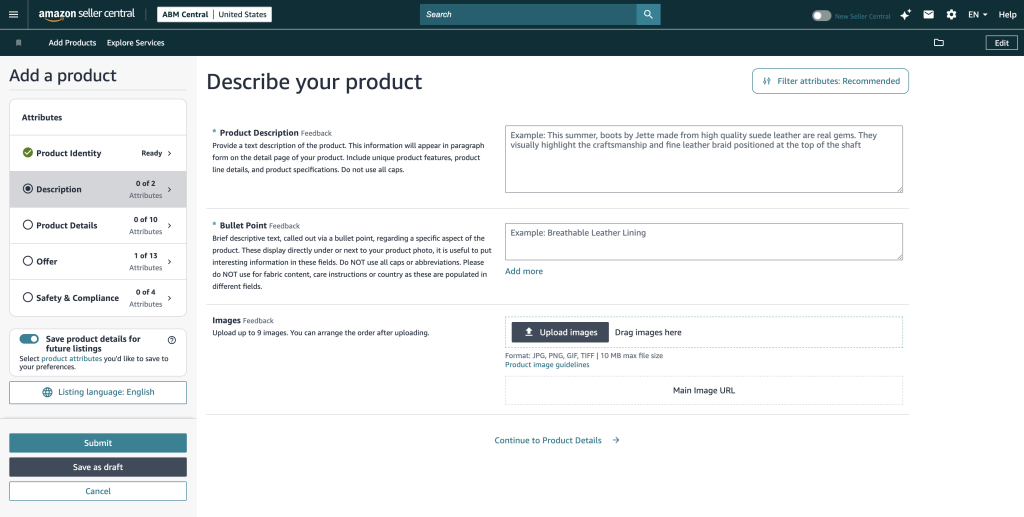
Once your copy is finished:
Open Seller Central.
Navigate to:
Catalog → Add Products
Fill in:
- Product title
- Bullet points
- Description
- Product details
Most importantly…
Locate the Generic Keywords field under All Attributes.

Paste your backend keyword list there.
This hidden field often gets overlooked but plays an important role in keyword indexing.
Most Sellers Stop Too Early
Here’s where I see sellers lose money.
They publish their listing…
…and assume everything is working.
Don’t.
Publishing your listing does not guarantee Amazon indexed your keywords.
Those are two different things.
Verify Your Listing Is Indexed
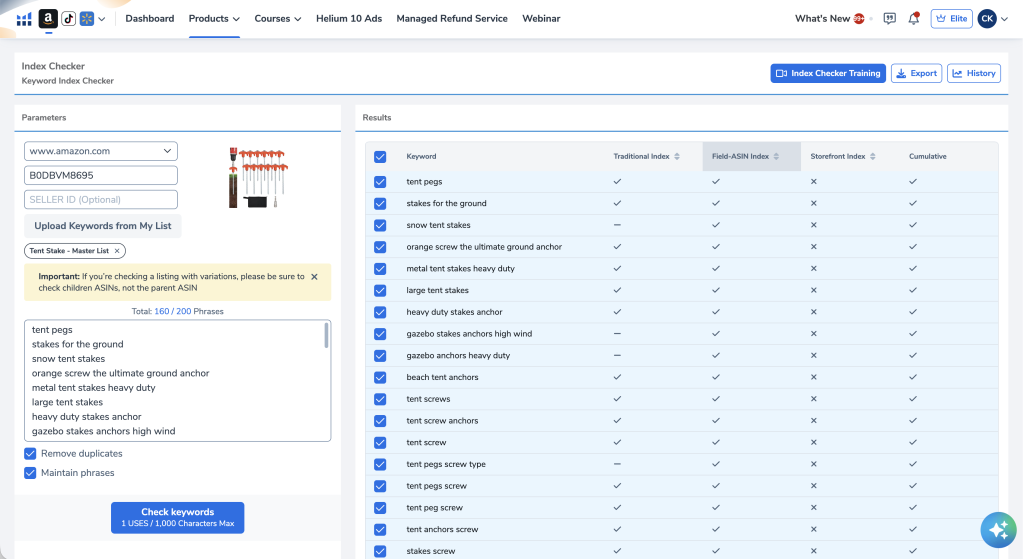
Indexing simply means Amazon recognizes your product for a keyword.
If Amazon hasn’t indexed your keyword…
You can’t rank for it.
Even if it’s written perfectly inside your listing.
Here’s where we can use Helium 10’s Index Checker tool to verify:
- Every important keyword
- Every phrase
- Every variation
If something isn’t indexed:
Go back.
Add the missing phrase naturally.
Wait for Amazon to update.
Then test again.
Track Your Keyword Rankings
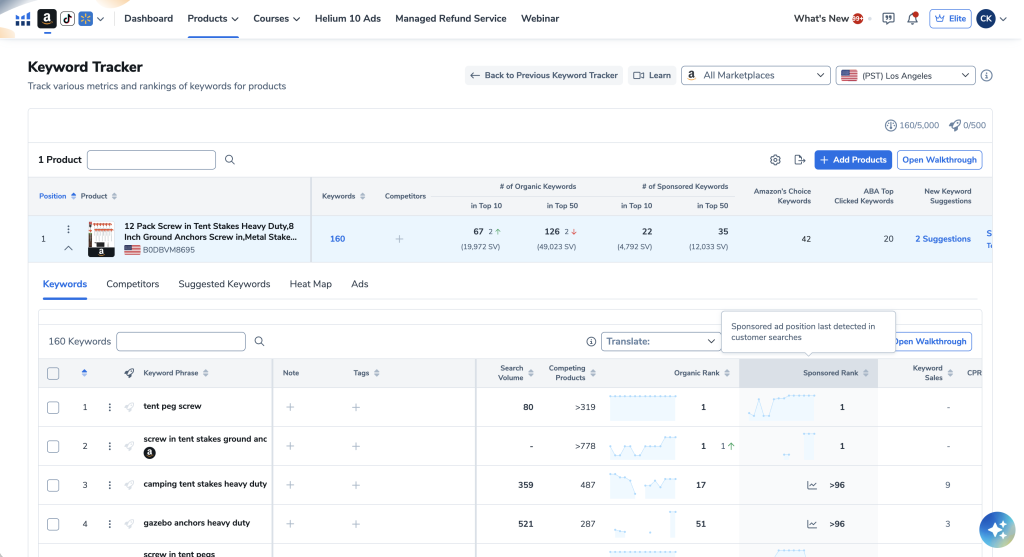
Once you’re indexed…
Now monitor rankings using Helium 10’s Keywork Tracker tool.
Tracking allows you to answer questions like:
- Which keywords are climbing?
- Which keywords are falling?
- Is my launch working?
- Is my PPC helping?
Without tracking…
You’re flying blind.
Metrics Worth Watching
| Metric | Why It Matters |
|---|---|
| Organic Rank | Shows natural ranking improvements |
| Sponsored Rank | Measures PPC visibility |
| Top 10 Keywords | Indicates strong organic performance |
| Top 50 Keywords | Tracks overall visibility |
| Indexed Keywords | Confirms Amazon recognizes your listing |
Tracking these over time helps you make informed optimization decisions instead of guessing.
Common Amazon SEO Mistakes
Avoid these costly mistakes:
Guessing Keywords
Always use Amazon search data.
Keyword Stuffing
More isn’t always better.
Write naturally.
Using Google Data
Google shoppers and Amazon shoppers behave differently.
Ignoring Backend Keywords
You’re leaving valuable indexing opportunities on the table.
Never Checking Indexing
Just because you added a keyword doesn’t mean Amazon indexed it.
Never Tracking Rankings
If you don’t measure results…
You can’t improve them.
My Recommended Amazon SEO Workflow
Here’s the exact workflow I follow whenever I optimize a listing.
| Step | Action |
|---|---|
| 1 | Identify top competitors |
| 2 | Reverse ASIN lookup |
| 3 | Filter keyword data |
| 4 | Remove irrelevant terms |
| 5 | Build keyword folders |
| 6 | Expand keyword research |
| 7 | Generate typo keywords |
| 8 | Write optimized title |
| 9 | Write benefit-driven bullets |
| 10 | Complete description |
| 11 | Add backend keywords |
| 12 | Publish listing |
| 13 | Verify keyword indexing |
| 14 | Track rankings |
| 15 | Continuously optimize |
Final Thoughts
Amazon SEO isn’t about finding a magic keyword or stuffing your listing with every search term you can think of. It’s about building a strategy.
Start with solid keyword research. Organize your keywords into meaningful groups. Build a listing that’s optimized for both Amazon’s algorithm and your customers. Then verify that your keywords are actually indexed and track your rankings over time.
The sellers who consistently grow their businesses aren’t guessing—they’re making decisions based on real data.
Remember, ranking higher is only half the battle. Once customers land on your listing, your images, copy, pricing, reviews, and overall presentation need to convince them to click the Add to Cart button. That’s where SEO and conversion optimization come together to create long-term success.
Finally, don’t forget that your listing is never truly “finished.” Amazon is constantly changing, competitors are always optimizing, and customer search behavior evolves over time. Continue refining your keywords, monitoring your rankings, and improving your listing based on real performance data.
The more intentional your optimization process becomes, the easier it is to increase organic visibility, reduce your dependence on paid advertising, and build a product that consistently climbs the Amazon search results.