NEW Helium 10 AI Agent: Use Helium 10 Data Without ChatGPT or Claude

Helium 10 just released something that I think a lot of Amazon sellers are going to find really useful.
It’s called Helium, and it’s a new AI agent built directly inside Helium 10.
The easiest way I can explain it is this:

It’s basically like having ChatGPT or Claude inside of Helium 10, except it already has a direct connection to Helium 10’s data.
If you’ve been following what Helium 10 has been doing with AI, you may already know about the Helium 10 MCP.
MCP allows you to connect Helium 10 data to outside AI platforms so you can ask questions about your Amazon business without constantly exporting spreadsheets and uploading reports.
That’s already extremely useful.
But the new Helium AI Agent takes a slightly different approach.
Instead of bringing Helium 10 into ChatGPT or Claude, Helium 10 is bringing the AI directly into its own platform.
And for some sellers, that may actually be the easier option.
I recently hosted a live stream with Shivali Patel introducing the launch of Helium’s new MCP, you can check it out here:
What Is the Helium 10 AI Agent?
Helium is an AI assistant located directly inside Helium 10.
You can open it, type a question just like you would in ChatGPT or Claude, and Helium can use Helium 10 tools and data to answer you.
For example, instead of manually opening Cerebro and setting up filters, you can ask:
Use Cerebro to compare my ASIN against this competitor and show me any keywords where I’m not ranked in the top 30 but they are organically ranked in the top 10.
Helium can then run that analysis for you.
That’s really the whole idea.
Rather than navigating around Helium 10 trying to figure out which report you need, you can simply tell the AI what you’re trying to find.
Why Would You Use Helium Instead of Helium 10 MCP?
This is probably the biggest question.
If Helium 10 already has MCP, why do we need another AI tool?
The answer is that they serve slightly different purposes.
With Helium 10 MCP, you’re connecting your Helium 10 data to an outside AI platform such as ChatGPT or Claude.
That means you’re still using the outside AI service.
Depending on which service you’re using, that may mean:
- Paying for an additional AI subscription
- Using your available AI usage or tokens
- Setting up the Helium 10 connector
- Waiting for data to move through the MCP connection
With Helium, the AI is already inside Helium 10.
There isn’t another platform in between.
Helium AI Agent vs. Helium 10 MCP
| Helium AI Agent | Helium 10 MCP |
|---|---|
| Built directly into Helium 10 | Connects Helium 10 to outside AI tools |
| No separate ChatGPT or Claude workflow required | Uses ChatGPT, Claude, or another compatible AI |
| Direct access to Helium 10 tools and data | Accesses Helium 10 through the MCP connection |
| Designed specifically around Helium 10 | More flexible for outside AI workflows |
| Easy for beginners | Great for advanced AI users |
I don’t necessarily think one replaces the other.
If you already love using Helium 10 MCP with ChatGPT or Claude, keep using it.
But if you like the idea of AI-powered Helium 10 research and don’t want another AI subscription or another platform involved, Helium gives you another option.
Why the Direct Connection Matters
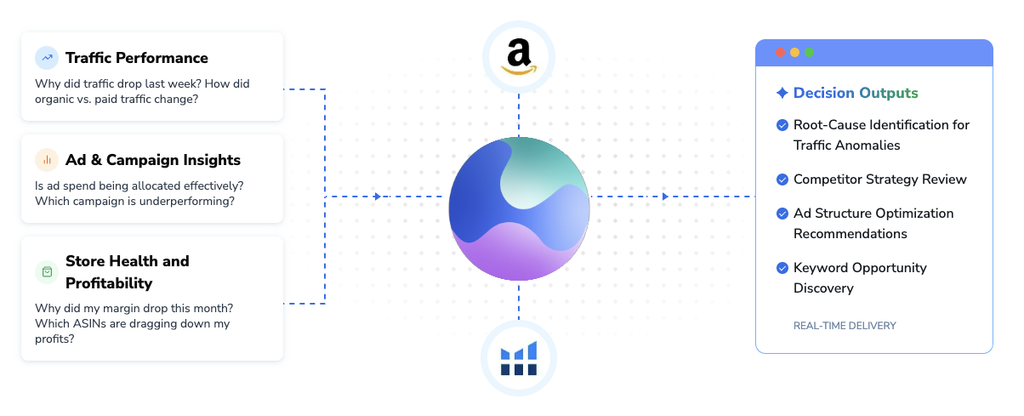
One thing I noticed while testing Helium is that it can feel faster because it is already sitting inside Helium 10.
With MCP, there is another step involved.
Your AI platform has to communicate through the connector, request the Helium 10 information, receive it, process it, and then answer your question.
Helium doesn’t have that same extra layer.
It’s working directly inside the Helium 10 environment.
That can make the whole process feel much more natural.
You ask a question.
It runs the appropriate Helium 10 analysis.
You get your answer.
Example #1: Use Cerebro to Find Competitor Keyword Gaps
One of the first things I tested was competitor keyword research.
I took one of my own ASINs for a tent stakes product and compared it against a competitor.
Normally, I could do this manually inside Cerebro.
I’d enter both ASINs, run the search, start applying filters, compare organic rankings, and then look for opportunities.
Instead, I asked Helium something similar to:
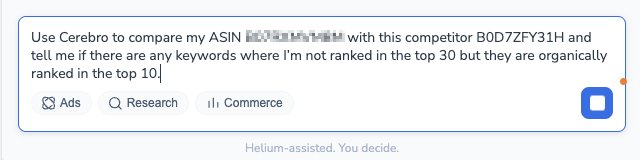
“Use Cerebro to compare my ASIN with this competitor and tell me if there are any keywords where I’m not ranked in the top 30 but they are organically ranked in the top 10”
Helium went ahead and ran Cerebro in the background.
In my case, it found only 38 keyword gaps matching those conditions.
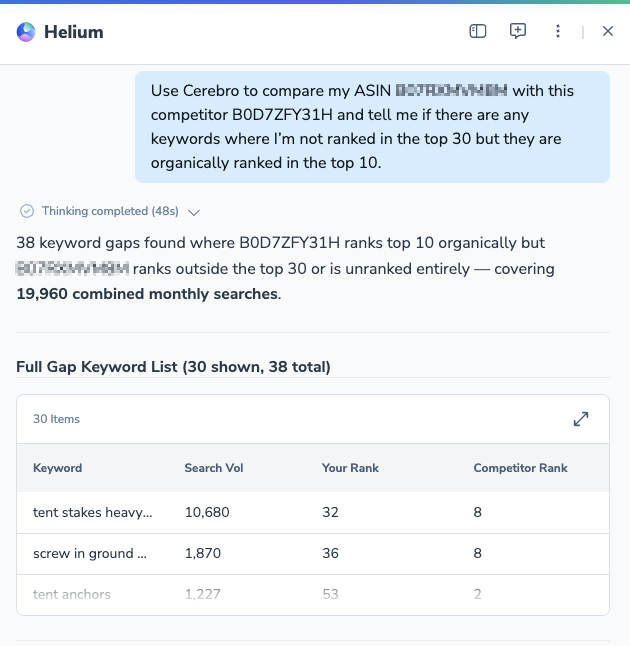
That’s powerful data I can use to optimize my listing to improve ranking for all of the important keywords where that competitor is performing well.
Now you’ve immediately identified potential ranking opportunities.
A Useful Cerebro Prompt
You could also try following the prompt it with:
“Sort those keywords by search volume and show me the 10 biggest opportunities.”
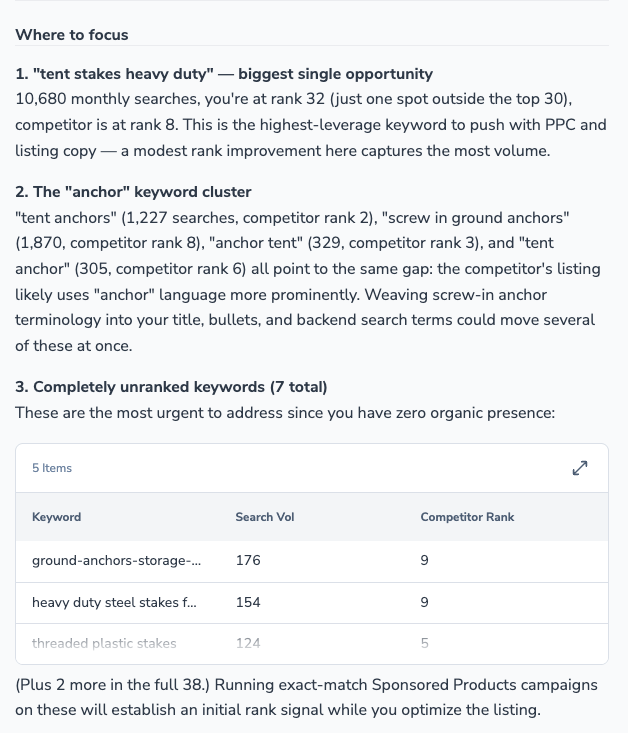
That’s much faster than manually sorting through a large Cerebro report.
You could then start looking at:
- Search volume
- Keyword relevance
- Organic rank
- Sponsored rank
- Competitor rank
- Whether the keyword already drives sales
And because you’re already having a conversation with Helium, you can simply keep going.
Example #2: Analyze Search Query Performance
The next thing I tested was Search Query Performance.
I asked:
“Show me from Search Query Performance the keywords from the last three months that have driven at least three sales for this ASIN.”

Helium came back with 263 keywords that met those conditions.
That by itself is useful.
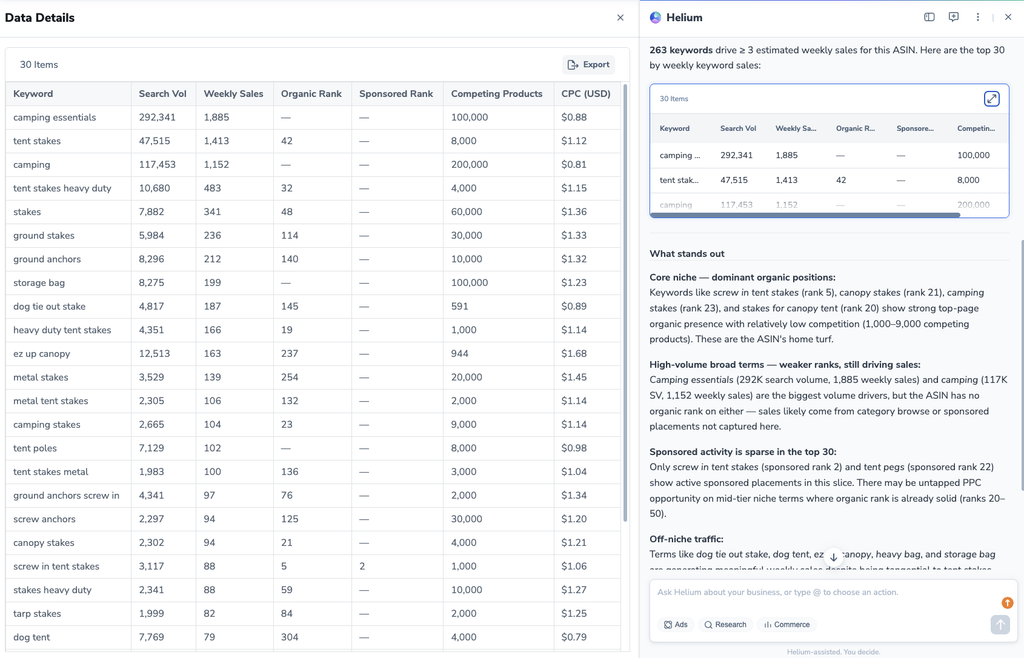
Instead of manually going into Search Query Performance and sorting everything, I immediately had a list of terms that had actually generated purchases.
And this is important.
Search volume is useful.
Keyword ranking is useful.
But at the end of the day, I really want to know:
Which keywords are actually producing sales?
Those are the terms that deserve attention.
Helium Went Beyond the Question I Asked
Something else happened during this test that I thought was interesting.
Helium didn’t just give me the requested list.
It also started pointing out additional insights.
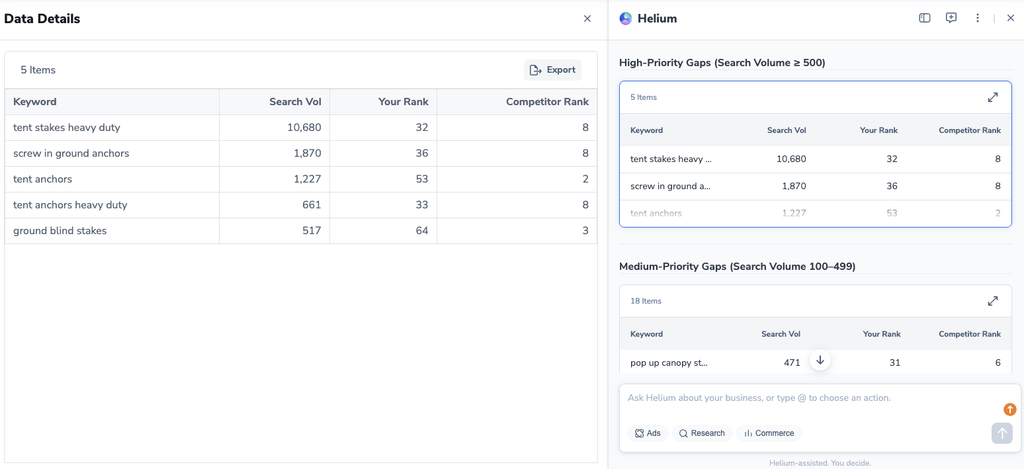
For example, it identified:
- My number-one search driver
- Branded or near-branded terms
- Conversion-rate information
- Ranking-gap opportunities
It was essentially saying:
Here’s the information you requested, but here’s something else in the data that you should probably pay attention to.
That’s where this starts becoming more useful than simply running a report.
A traditional report gives you data.
You still have to recognize the opportunity.
An AI agent can potentially help point the opportunity out.
Questions You Can Ask the Helium AI Agent
You don’t need to start with complicated prompts.
You can ask extremely simple questions.
For example:
- Which ASIN had the highest sales last month?
- Which product has the highest revenue?
- Which keywords are my competitors ranking for that I’m not?
- How do my listings compare with my top competitors?
- Which keywords drove the most sales over the last three months?
- Which keywords have the biggest ranking gaps?
- How is my ACoS trending?
- Which products need my attention?
The goal is to treat Helium more like an assistant than another report.
Where I Think Helium Is Going
The Helium AI Agent is still new.
This is not the finished version of what this technology is eventually going to become.
But I think you can already see where it’s headed.
Right now, we’re mostly asking questions.
Eventually, I think AI agents like this will become much more like employees.
You might be able to tell Helium:
“Review my business every morning and tell me what changed.”
Or:
“Monitor my keyword rankings and alert me when an important keyword drops.”
Or:
“Review my advertising performance every week and tell me which campaigns need attention.”
Instead of you constantly checking everything manually, the AI becomes something that’s helping you monitor the business.
That’s where I think this gets really exciting.
Who Should Try the Helium AI Agent?
I think there are two groups that should pay particular attention to this.
Beginners
If you’re new to Helium 10, it can take a while to learn every tool.
You might know that you want to find competitor keywords, but you don’t necessarily know that Cerebro is the tool you should be using.
With an AI agent, you may not need to know.
You simply ask:
“Which important keywords is this competitor ranking for that I’m not?”
That’s much easier for a beginner.
Experienced Sellers
If you’re already experienced with Helium 10, you know exactly where everything is.
Your problem is probably time.
If I can ask one question instead of opening three different Helium 10 tools and manually comparing reports, I’m interested.
That’s where the productivity benefit comes in.
Helium AI Agent Prompt Ideas
Here are a few prompts I would start experimenting with.
| Goal | Example Prompt |
|---|---|
| Competitor keywords | Compare my ASIN against this competitor and show keyword gaps |
| Cerebro analysis | Find keywords where they’re top 10 and I’m outside the top 30 |
| Sales-driving keywords | Show Search Query Performance terms that generated at least three sales |
| Ranking opportunities | Find high-converting keywords where my organic ranking is weak |
| Competitor analysis | Compare my listing against my top competitors |
| Sales analysis | Which ASIN had the highest sales last month? |
| PPC | How has my ACoS changed over the last 30 days? |
| PPC diagnosis | Which campaigns are causing my ACoS to increase? |
The biggest thing I’d recommend is asking follow-up questions.
If Helium gives you 40 keywords, don’t stop there.
Ask:
“Which five are most important?”
Then:
“Why?”
Then:
“Which ones have the biggest ranking gap?”
Then:
“Which should I focus on first?”
That’s how you turn the initial data into something actionable.
Final Thoughts
I think the Helium AI Agent is an interesting addition to Helium 10 because it makes the platform much more conversational.
Instead of thinking:
Which tool do I need to open?
You can start thinking:
What question am I trying to answer?
If you want competitor keyword information, ask.
If you want Search Query Performance data, ask.
If you want to know which ASIN performed best last month, ask.
If you want to know how your ACoS is trending, ask.
Helium can start doing some of that digging for you.
And if you’ve wanted to experiment with Helium 10 MCP but didn’t want to add ChatGPT or Claude into your workflow, this gives you another way to start using AI with your Helium 10 data.
It’s still early, and I’m sure the agent will become much more capable over time.
But even right now, being able to run Cerebro research, analyze Search Query Performance, compare ranking gaps, and ask follow-up questions directly inside Helium 10 can save a lot of time.
If you’re on the Diamond plan and you have access, I’d recommend opening Helium and experimenting with your own ASINs.
Start with something simple.
Compare yourself against a competitor.
Ask which keywords you’re missing.
Check which Search Query Performance terms are driving sales.
Then keep drilling deeper.
Because I think we’re starting to move toward a future where instead of spending all day digging through Amazon seller software, we simply ask the software what we want to know.